DITO Philippines eSIM Guide: Official Pricing, Passport SIM Registration, and Keep-Alive Rules
DITO prepaid eSIM purchase, install, and passport SIM registration; official checks on the ₱99/15-day pack, the 90-day permanent disconnect after Load falls bel
What this guide covers
Source author @artistd4qu (淡寫, 10:11 Asia/Shanghai on 30 Oct 2026) describes getting a Philippine +63 number with DITO prepaid eSIM, mainly for SMS codes and low-cost keep-alive, and as a prerequisite for services such as Maya.
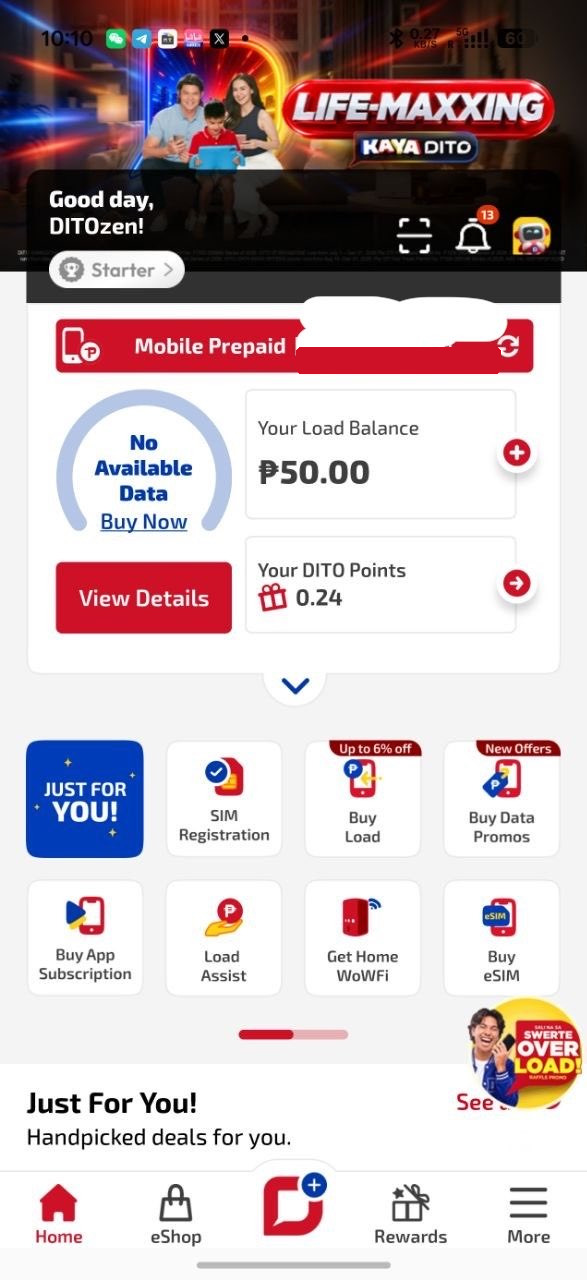
The source is a long text post with only one DITO App home screenshot—no step-by-step UI set. This article follows that flow and checks fees, SIM registration, and keep-alive rules against official DITO pages and the subscription terms. No invented personal tests. Prices the author saw, the “₱5 / ₱10 keeps the number about a year” claim, and similar anecdotes are labeled as the source author’s case; official pages win on conflicts.
Official: DITO eSIM · DITO eShop · SIM Registration · Subscription Terms (updated 15 Sep 2026) · DITO App · eSIM setup
This site already has a Maya signup guide (166), which treated DITO only as a prerequisite. This article covers the DITO eSIM itself and does not repeat Maya KYC.
Official checks (important)
| Topic | Source post | Official check (captured 10 Nov 2026, Asia/Shanghai) | | --- | --- | --- | | Signup price | About 79–89 PHP, confirm at checkout | The eSIM page lists a new prepaid eSIM at ₱99, with 9GB all-access data, unlimited texts to all networks, unlimited DITO-to-DITO voice/video, and 150 minutes to other networks, valid 15 days. The eShop home showed a ₱89 sale vs a ₱99 list price. Banner small print described a Level-Up 99 promo extended to 30 Jun 2026, which has passed. Use the live App / eShop checkout price and inclusions—do not treat ₱79 or an expired promo as a fixed official price | | Monthly fee | None | Prepaid usually has no fixed monthly fee, but that does not make the number permanent; see keep-alive below | | Keep-alive | Top up ₱5 or ₱10; author says that can extend about a year | Terms 4.4: the SIM stays serviceable while it has Load. If Load falls below ₱1.00 and no Promo still allows some service, the line is temporarily disconnected. If that lasts 90 days or more, the subscription is permanently disconnected, the SIM is disabled, and the number is blocked and will not be reissued. Regular Philippine prepaid load is generally subject to the NTC/DTI/DICT joint memo (about one year from top-up for ordinary load). That is load validity, not an official “₱5 keeps you for a year” promise. Treat ₱5 / ₱10 ≈ one year as the author’s case; always check the balance and status after a top-up | | Incoming SMS | Free; no data promo needed if you only want OTPs | Official prepaid pages do not clearly promise “incoming SMS free forever.” If Load drops below ₱1, the line may be temporarily disconnected, and then SMS usually will not work normally. Do not assume you can keep receiving codes with a drained balance | | Data | Buy a promo separately | The ₱99 pack (if still offered at checkout) already includes 9GB for 15 days. After that, buy a Promo in the App if you need data. For keep-alive only, the priority is maintaining Load, not continually renewing the 15-day data pack | | Payment | WeChat Pay, about a dozen RMB | The App page lists debit/credit cards, GCash, GrabPay, Maya, ShopeePay, and WeChat Pay for load/promos. Confirm whether WeChat Pay appears on the eSIM checkout | | Registration | In-app “Register my DITO number,” Passport, personal details and a Philippine address | The SIM Registration Act (RA 11934) requires registration before activation. Official SIM registration for tourists: passport + proof of address in the Philippines + return ticket; for foreigners on a non-tourist visa: passport + proof of address in the Philippines + documents such as an AEP, ACR I-Card, or student ID. The source’s “passport + fill a PH address” is incomplete. Use a real, verifiable address. Do not use address generators or claim Filipino citizenship you do not have |
In the thread, a reader said top-ups “only last a dozen days”; the author replied to buy a promo first, then top up load to keep the number. Those “dozen days” more likely refer to the included 15-day Promo, not a 15-day number life. Whether the number survives is governed by the Load / 90-day rule in the terms.
Who it may suit
Maybe: You need a +63 number for SMS, you can install an eSIM (or have a lawful writer setup), you can complete official SIM registration, and you accept prepaid keep-alive with prices that can change.
Caution: You lack proof of a Philippine address, a return ticket, or other documents the official tourist/foreigner lists require, and you hope that typing an address is enough; you treat this number as a guarantee of a Maya or bank account; your device (including many Chinese-market iPhones) has no native eSIM and you have no other supported option; you top up once and never check the balance again.
A Philippine number does not guarantee a Maya account. Maya may still require identity checks, address, and eligibility. See the published 166. If you continue to Maya, official referral campaigns exist; the invite code is @mouseone (rewards and conditions follow Maya’s live rules).
Before you buy
- The official DITO App. Terms list Google Play, the Apple App Store, and Huawei App Gallery; availability depends on your store region. This guide does not recommend or document fingerprint browsers or unofficial store workarounds
- A valid passport (photograph the original, not a screen)
- Documents that actually match the official foreigner/tourist list above—do not invent them
- A lasting email address: the eSIM QR and activation details are typically sent there. Official guidance is to keep a copy of the QR; you may need it to reinstall
- An eSIM-capable device: “Add eSIM” in settings, or an EID. The author notes that Chinese-market iPhones usually lack native eSIM and may need another eSIM phone/tablet or a writer such as XeSIM—that is the author’s setup; compatibility depends on the device and OS. Do not use jailbreaks or region-restriction bypasses
- Payment: the author used WeChat Pay; official channels also list cards and other e-wallets. Confirm at checkout
Official notes: you cannot use the same eSIM on two devices at once; after a QR is installed on one phone, it cannot be scanned again on another; handset transfer was still being developed. If you lose a QR before activation, you can request a free replacement via an in-app ticket, but official text says the new QR comes with a different number. Official iOS note at capture: 4G data only.
Buy the DITO eSIM
Official channels: eShop in the DITO App, eshop.dito.ph, and DITO Experience Stores. The author’s path is DITO App → eShop, then the cheapest eSIM shown.
Author’s steps (UI can change; follow the live App):
- Open the DITO App and go to eShop / Buy eSIM.
- Choose a prepaid eSIM. The author saw about 79–89 PHP; at our capture the site listed ₱99, with a ₱89 eShop sale. Checkout wins.
- If the App says the current device does not support eSIM, the author chose to use it on another device.
- Enter an email, then the verification code.
- Pay (the author used WeChat Pay).
- Do not quit immediately. The author warns that a spinning page does not always mean a failed payment. Check the order page and email first—do not pay twice.
- Wait for the order, the eSIM QR, and the 11-digit Philippine number; confirm the email as well. Keep the QR and order number.
Install the eSIM
Official outline:
- Android: Settings → SIM card manager → Add eSIM → scan the QR, follow the prompts, register in the DITO App, then restart.
- iPhone: Settings → Cellular → Add eSIM → scan or upload the QR. You can also touch and hold the QR in the email. Official text allows manual entry of the SM-DP+ address and activation code from the email if scanning fails.
- Writer device: follow that device’s instructions, then enable the line in the phone’s SIM settings. This article does not review any brand.
After install, wait for network registration, confirm SMS, then complete registration. Official process: register the eSIM in the DITO App and complete SIM registration before full activation; new lines must be registered before use.
Passport SIM registration (KYC)
This is required by law. Author’s path: DITO App → Register my DITO number → enter the 11-digit DITO number → SMS code → ID type Passport → upload the bio page and complete liveness → fill personal details and address → submit and wait.
Important:
- Choose the foreign-national option that matches your actual status. Do not claim Filipino citizenship you do not have.
- Official tourist and non-tourist-foreigner document lists are stricter than “fill a Philippine address”—see the table above. Without real, verifiable proof of address in the Philippines (and a return ticket for tourists), you may not meet the official requirements.
- Address generators are not a substitute for a real address, and a made-up address should not be reused for a bank account.
- After approval, check for a confirmation SMS and keep your App login safe.
Top up to keep the number
Author’s path: Buy Load in the App, pick the lowest amount then allowed. The author says ₱5 or ₱10 can extend the line about a year, while also saying to follow official rules and the on-screen validity after the top-up. In a reply, the author added: start a promo first, then top up load.
After checking the official terms, a cautious approach is:
- Keep two clocks separate: the 15-day included Promo (when it ends, the pack is used up), and whether the line itself stays in service (Load ≥ ₱1, and any temporary disconnect has not reached 90 days).
- In Buy Load, buy regular Load (do not treat a short promo as keep-alive). Return to the home screen and check Load Balance; do not rely only on the payment-success page.
- Keep Load at ₱1 or above. Below ₱1, with no Promo still supporting service, the 90-day temporary-disconnect clock starts; after 90 days the number is permanently lost and cannot be reissued.
- “₱5 / ₱10 ≈ one year” is the author’s experience, not a DITO pack promise. Ordinary load may have a long validity, but still confirm what the account shows, and check again before it lapses—do not wait until day 89 of a disconnect.
The source screenshot also shows SIM Registration, Buy Load, and Buy eSIM, plus “No Available Data.” That only means no data promo was active; it does not by itself mean the number is dead.
What it can and cannot do
The author’s focus is a +63 number for Maya and similar local services. The post also mentions regional prices for some digital subscriptions (the author cited about 999 PHP for a Philippine-region GPT plan). That figure was not checked against an official subscription page in this article; treat it as the author’s observation and confirm on the live page. It is not a DITO tariff.
Again: a DITO number only covers the “Philippine mobile number for SMS” step. Maya signup, upgrade, and cards have their own checks—see 166.
Checklist
- Install the official DITO App and buy a prepaid eSIM in eShop (live checkout price; do not reuse expired promos or the author’s ₱79 observation).
- After payment, check the order and email before paying again; save the QR and 11-digit number.
- Install on an eSIM-capable device (or a writer, per its own instructions) and confirm SMS.
- Complete SIM registration with a passport and the official foreigner/tourist documents; use a real, verifiable address.
- Use Buy Load to keep Load ≥ ₱1. Do not confuse a 15-day promo expiry with number death, and do not treat the author’s ₱5 / ₱10 story as an official guarantee.
- For Maya, see 166; a number alone is not approval.
Sources
- Source post: https://x.com/artistd4qu/status/2115989951288336833 (@artistd4qu). No referral code in the source. Thread replies are background only and are not official rules.
- Official: dito.ph eSIM page, eShop, SIM Registration, Subscription Terms (updated 15 September 2026), App landing, and eSIM setup article.
- BiyaPay is not involved. Re-check the official site and App before you buy or register.