VOXI UK student plan, edu check, first month free, eSIM, and keep-alive notes
VOXI (Vodafone family) student plans often include a free first month and more data. Community tutorials use edu plus GoCertify. Pick a plan on the student page
What this is
VOXI is a Vodafone UK mobile brand. No contract, rolling monthly. Community tutorials (NodeSeek and similar) use it for a UK number. After a student check you can open a first-month-free plan. Some tiers, on community notes, sit around 500GB of data, and the number can take codes.
This guide follows those public steps and adds a top-up note. VOXI's own top-up often fails. Vodafone's PAYG online top-up is the more reliable official door.
Offers, prices, and verify methods change. voxi.co.uk and the checkout page that day win.
Before you start
What you need
| Item | Notes | |------|------| | Student page | https://www.voxi.co.uk/acquisition/students | | Status | edu / student email, verified with GoCertify (or UNiDAYS / Student Beans) | | Device | An eSIM phone, or an eSIM writer such as ESTK | | Pay | First month £0 can still require a card. Next month auto-renews unless you cancel | | Address | A UK postcode / billing address (community notes pick one on a map. Use it legally) |
Eligibility and common stalls
- Student check fails. School not on the list, not currently enrolled, offer tightened
- Page jumps. Stay in one browser, ease ad blockers. A jump often means starting over
- Discount code. After verify you get a single-use code. Confirm checkout is £0 before you continue
- Mainland China signal and eSIM fit vary by phone. Not everyone succeeds
Risk
- Abusing a student offer can trip risk checks
- First month free is not free forever. Miss cancel and next month bills
- This is a process note. It does not promise a line, a top-up, or keep-alive
Steps
1. Open the student page and pick a plan
Open VOXI Students.
- The page will say first month free and extra student data
- During the offer, different price tiers usually all get the free first month under the rules
- Tap Choose this plan on the plan you want
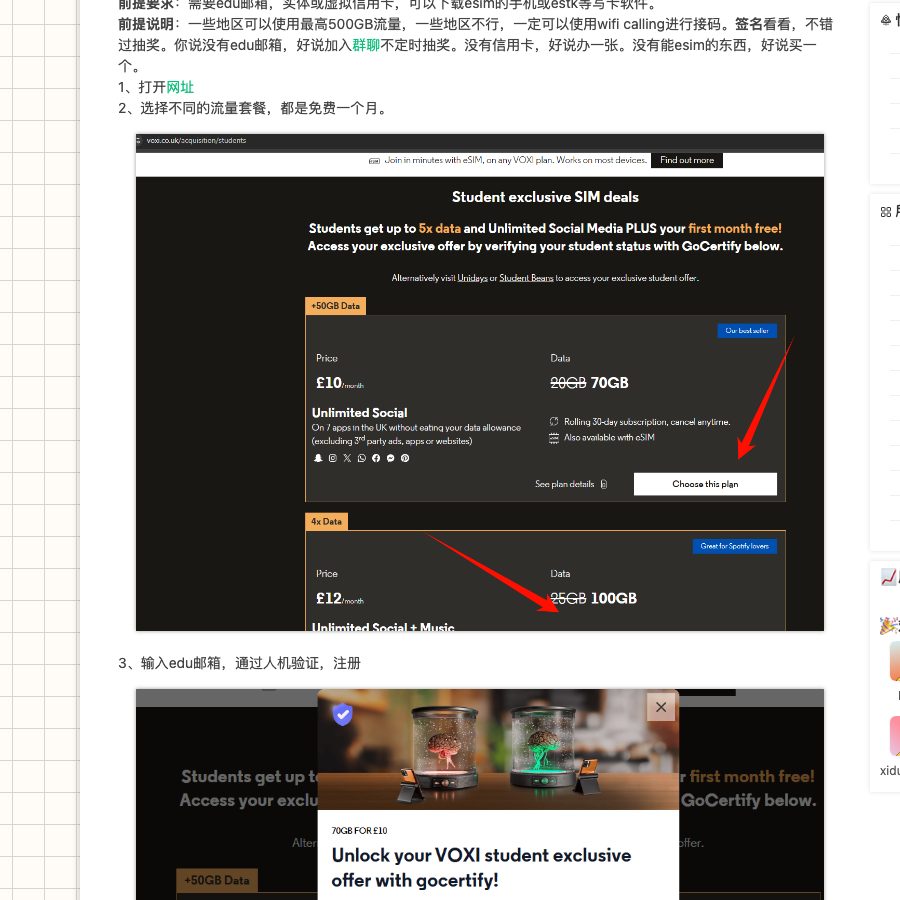
2. Finish student verify with GoCertify / edu
After you pick a plan, student verify (GoCertify) pops up.
- Enter the student (edu) email
- Finish the human check
- Tap Log in or sign up to Gocertify
- Open the mail for the pin / code and paste it back
If the page asks you to confirm email again, follow it.
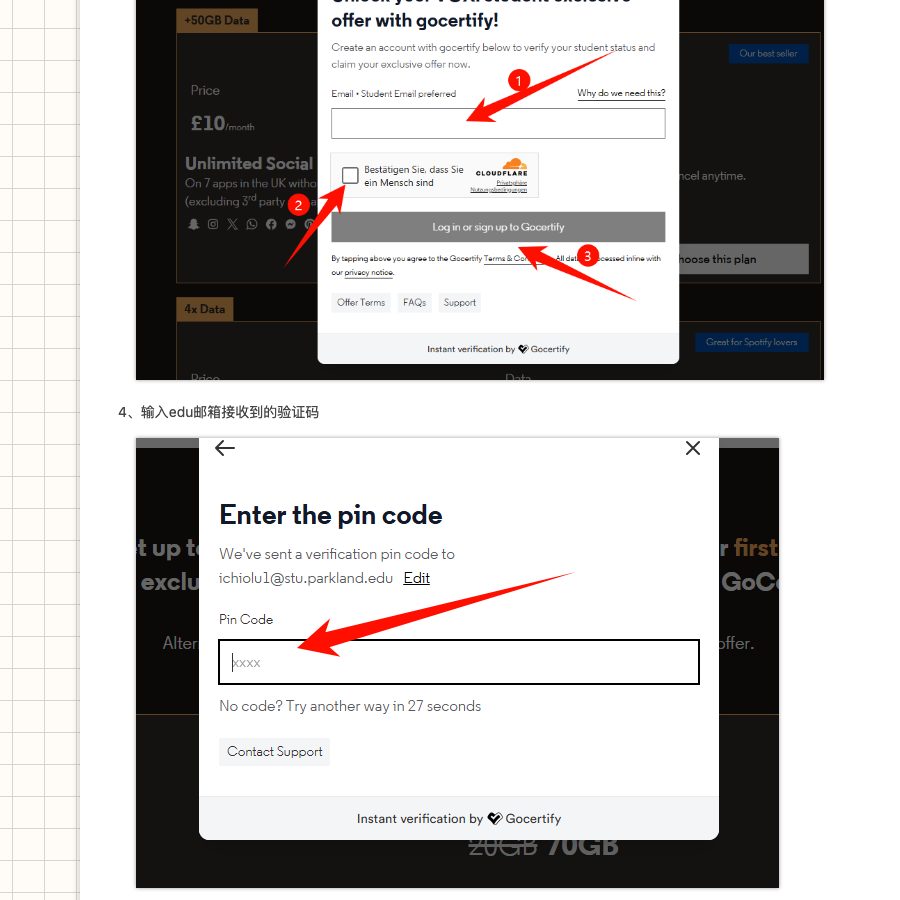
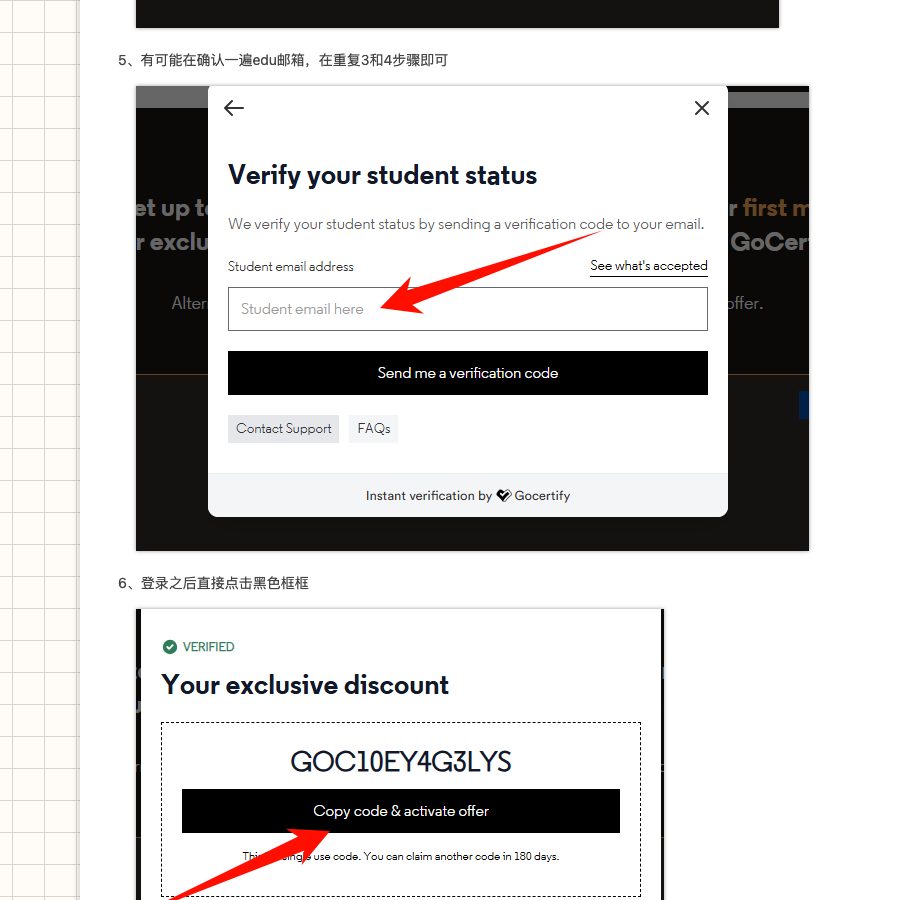
3. Copy the discount code and activate
After a pass you see Your exclusive discount and a code (shape follows your page).
- Tap Copy code & activate offer
- Usually single use, with a wait between claims (the page may say 180 days)
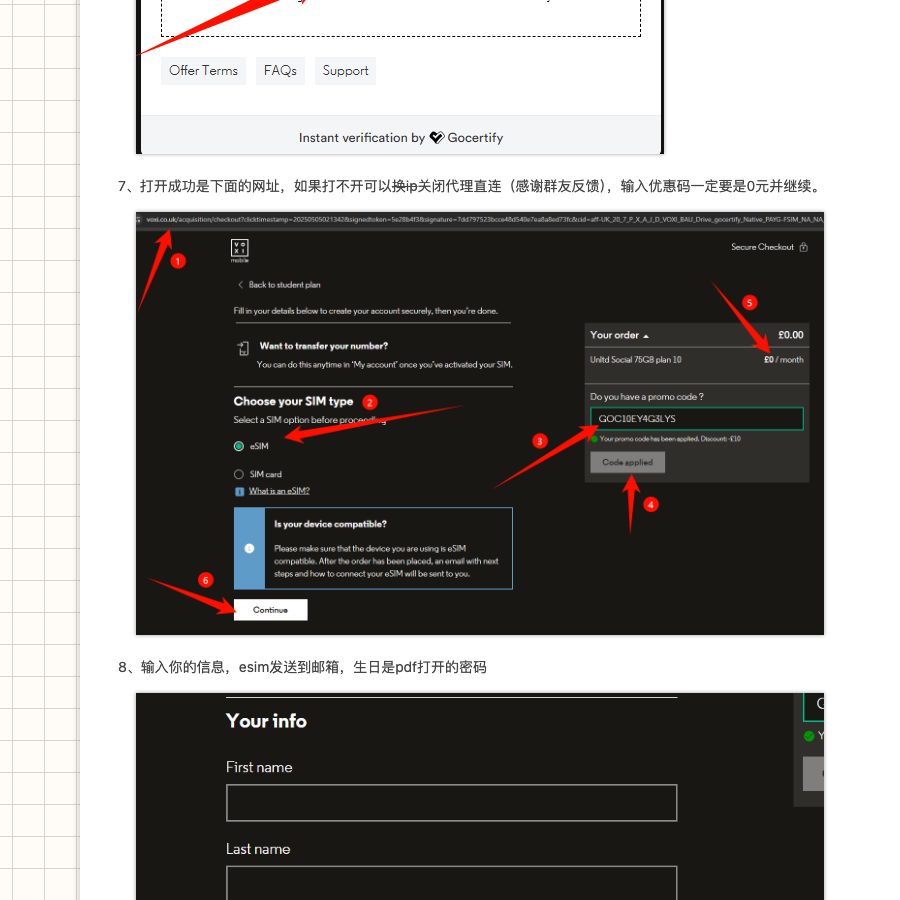
4. After login, tap the black entry to continue
After you log into VOXI, follow the tutorial and tap the black box / black button to continue (copy follows that day's page).
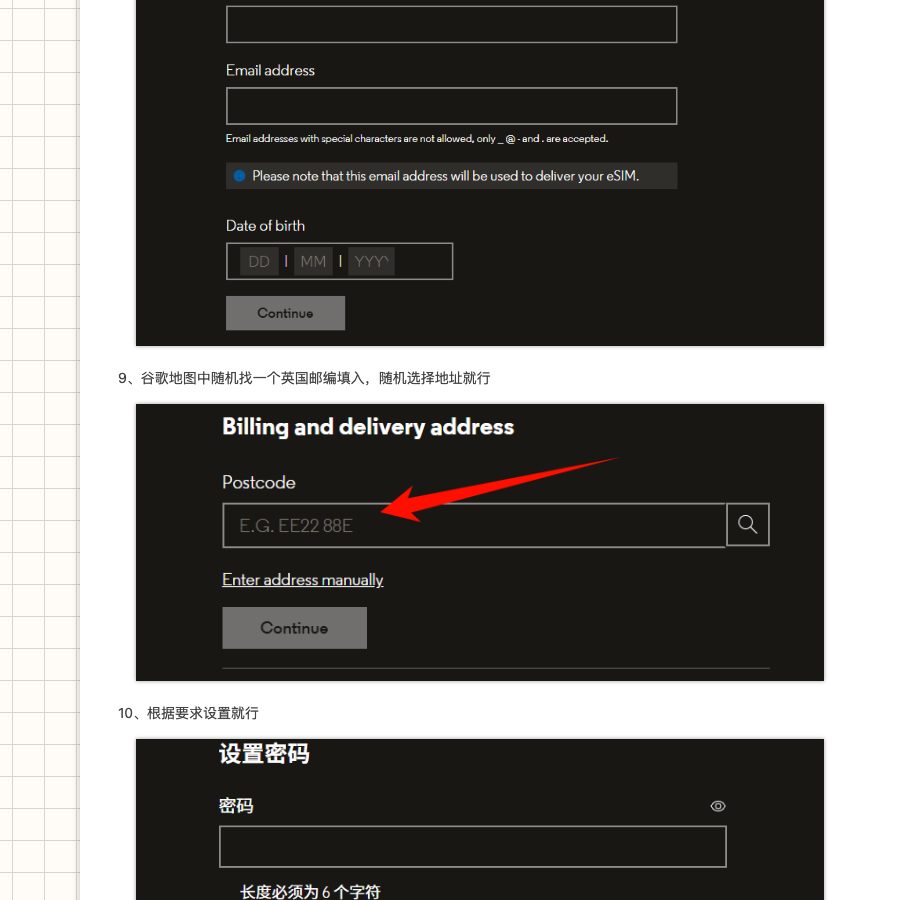
5. Enter email, birthday, and a UK address
- Email that will receive the eSIM mail
- Birthday
- Billing and delivery address. Community notes search a UK postcode on a map, then pick an address. Do not use this for fraud
- Set an account password
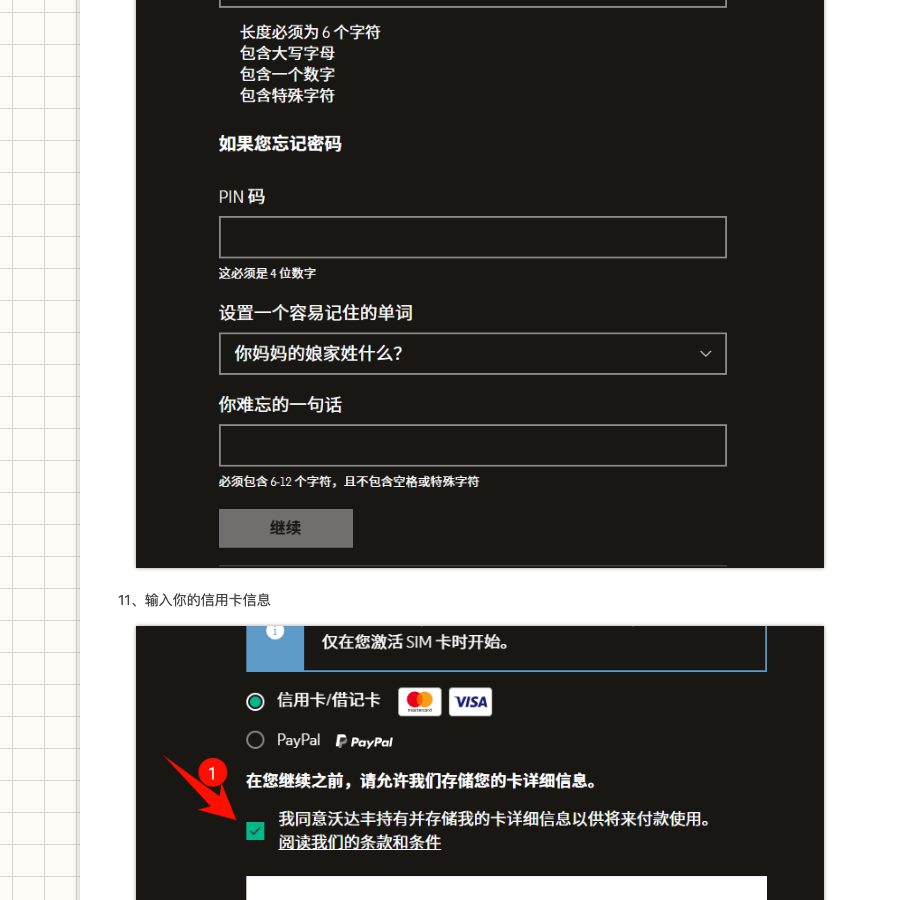
6. Confirm the code makes the total £0, then bind payment
- After the code, the order should be £0 before you continue
- If it is not zero, do not pay. Check the student code and the student plan
- A card bind is still common (for next month's renew)
Community notes. If the success page will not open, try another IP or turn the proxy off and go direct.
7. Install the eSIM and test
After pay / order success
- Open the mail for the eSIM QR or activation details
- Scan on the phone (or write with a writer)
- Wait to join the network (community notes, about 10 to 30 minutes)
- No signal. Try APN, airplane mode (phone-dependent)
Confirm UK SMS is stable before you use the number for important signups.
8. Cancel or pause if you only want the first month
If you only want the free month
- Log into VOXI
- Pause / Cancel plan, turn off auto-renew
- Community notes. After cancel, or after a switch to Pay as you go, the number can stay a while (common figure about 180 days, a balance change may refresh it). Terms and the account page win
Recheck status before the bill date so you are not charged by mistake.
Top-up (important)
In community notes and practice, VOXI's own top-up often fails (page error, debit without credit, card refused). If that path stalls, use Vodafone's PAYG online top-up instead. VOXI sits in the Vodafone family. That door is more stable for many people.
#### Recommended top-up page
Have the VOXI mobile number ready. Credit follows Vodafone / VOXI balance and SMS.
Open Vodafone PAYG online top-up
This is Vodafone's official Pay as you go top-up page, not a third-party reseller. If it asks you to log in or verify, follow the page. If it still will not top up, both live sites win.
#### Top-up notes
- Confirm the number is still usable / PAYG first
- Watch the minimum amount and any delay
- Do not hammer failed retries (risk checks)
- Third-party top-up shops carry number-leak and credit risk that you take yourself
One-line checklist
- Open the student page, pick a plan, GoCertify / edu verify
- Copy the student code, activate the offer, confirm checkout is £0
- Email / address / password, order, install the eSIM from mail
- First month only. Cancel or pause the plan
- VOXI top-up fails. Use the Vodafone PAYG online top-up button
VOXI / Vodafone sites, the student-verify vendor, the account page, mail, and the payment record win. This is a process note, not a line, top-up, or long keep-alive promise.
Carddoger take
The VOXI student path is edu / GoCertify, confirm £0 with the code, install the eSIM, then cancel renew yourself. Do not stay stuck on VOXI's own top-up.
Keep these first
- Confirm £0 before you pay. Otherwise stop
- First month only. Pause or cancel the plan so next month does not bill
- Keep-alive days and Paygo rules follow the account and terms (community figure about 180 days)
- VOXI top-up fails often. Vodafone PAYG online top-up is the more reliable door
- Offers and verify methods move. Mainland signal and phone fit are not guaranteed
VOXI / Vodafone sites, the student-verify vendor, the account page, mail, and the payment record win. This is a process note, not a line or top-up promise.