Webshare Static Residential IPs in 2026: Plan Types, Official Pricing, and How Connections Work
A fact-checked guide to Webshare static residential / ISP proxies, checked against the official site, pricing pages and help centre: how they differ from rotati
What this guide covers
Webshare is a self-service proxy provider based in the San Francisco Bay Area. It was founded in 2019 and was acquired by Oxylabs in 2022, after which it has continued to operate as a separate brand. The official site is www.webshare.io. It sells datacenter Proxy Servers, static residential / ISP proxies (Static Residential), and bandwidth-priced rotating residential proxies.
This guide checks the official website, pricing pages and help centre, and sets out how the static residential plans are split, what the public prices say, which options commonly appear in the purchase dashboard, and the three connection modes. There is no invented hands-on testing. Dashboard screenshots and third-party checker results supplied by users are examples only. They are not official promises and should not be treated as standing prices. This article does not provide any invitation or referral code.
Using a proxy to present a different network location when you register or use a bank, payment, brokerage or other account can breach that service’s terms and may raise compliance issues. This article describes Webshare as a commercial product. It does not treat a residential IP as a way to open an account, avoid a ban, or pass yourself off as a local resident.
Before you start
- Prices change. Public rate cards and the in-dashboard custom configurator are not always the same schedule. One checkout record from around October 2026 showed a Private plan with 250GB of bandwidth and a custom quantity of 2 IPs at USD 16.38 per year. That figure is a price from that moment. On the day this article was checked, the public shared static-residential table started at 20 IPs for USD 6 per month (USD 0.30 per IP); the public private table started at 25 IPs; the public dedicated table started at 20 IPs at USD 2.10 each. Official pricing copy says yearly billing saves 30% versus monthly billing, not 70%. Confirm on the pricing page and in the dashboard before you pay.
- Do not apply “80 million residential IPs” to the static plan. Official copy puts “80M+ ethically sourced Residential IPs” on the rotating residential product. The static residential page cites 100k+ proxies, speeds up to about 1 Gbps, HTTP/SOCKS5, and bandwidth “up to unlimited” subject to the fair-usage policy.
- The free allowance is not a residential IP. The official free plan includes 10 shared proxies and 1GB of bandwidth a month, with no credit card and no trial time limit. Those are datacenter / Proxy Server endpoints, not static residential IPs.
- Shared, private and dedicated describe who else uses the IP, not a different product line. Officially, shared IPs are used by many customers and are usually the prices shown on the public tables; private IPs may be shared with one or two other customers; dedicated IPs are assigned only to you. “Private” does not mean “only one or two people in your household.”
- No invitation codes. Register on the official site. Do not follow third-party links that carry a referral parameter. This article also does not provide invitation codes for any VPN, “airport,” bank or broker.
Who Webshare is
Oxylabs and Webshare confirmed the acquisition on 20 September 2022 and said Webshare would keep operating independently. Webshare’s own note said existing plans and the dashboard would stay in place, and that the acquisition was not framed as a price increase. The company was founded by Utku Zihnioglu.
Official static-residential copy lists scraping, account management, ad verification and long-running sessions that need a stable identity. Those are the vendor’s product claims. They do not mean a target site will treat an ISP-issued address as an ordinary home connection, and they do not mean the product can be used to get around a bank’s or a platform’s checks.
Webshare states 99.97% uptime. Some third-party tests have cited figures such as a 99.28% success rate and 0.86 seconds average response time. This article did not find that same set of figures on official pages and does not treat them as a current guarantee.
Static residential versus rotating residential
- Static Residential / ISP. The address is issued by an ISP and stays the same for a long period. Pricing is per IP. Plans typically include 250GB of bandwidth, with an option to move to “unlimited” bandwidth still subject to fair use. Official examples of ISPs include AT&T, Sprint, Cox and Lumen; the ASNs you can actually pick are whatever the dashboard offers that day.
- Rotating Residential. Pricing is per gigabyte. The official pricing page starts at about USD 3.50 per GB and falls to USD 1.40 per GB on larger plans. Official marketing cites a pool of more than 80 million IPs. This product suits work that needs a changing egress address. It is usually a poor fit if you only want one or two fixed IPs.
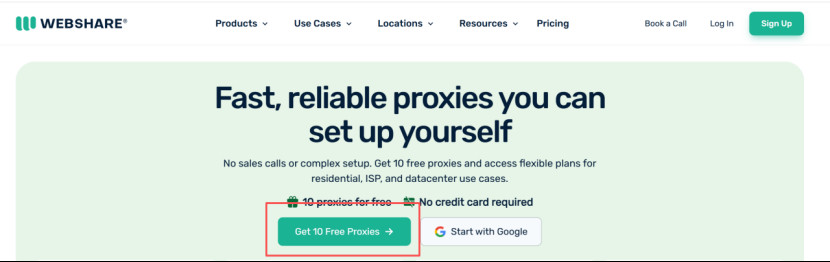
- Ten free datacenter proxies. The homepage offers “Get 10 Free Proxies” and “No credit card required.” That is a reasonable way to learn the dashboard and the connection flow. It is not a residential IP.
Shared, private and dedicated, and one recorded checkout price
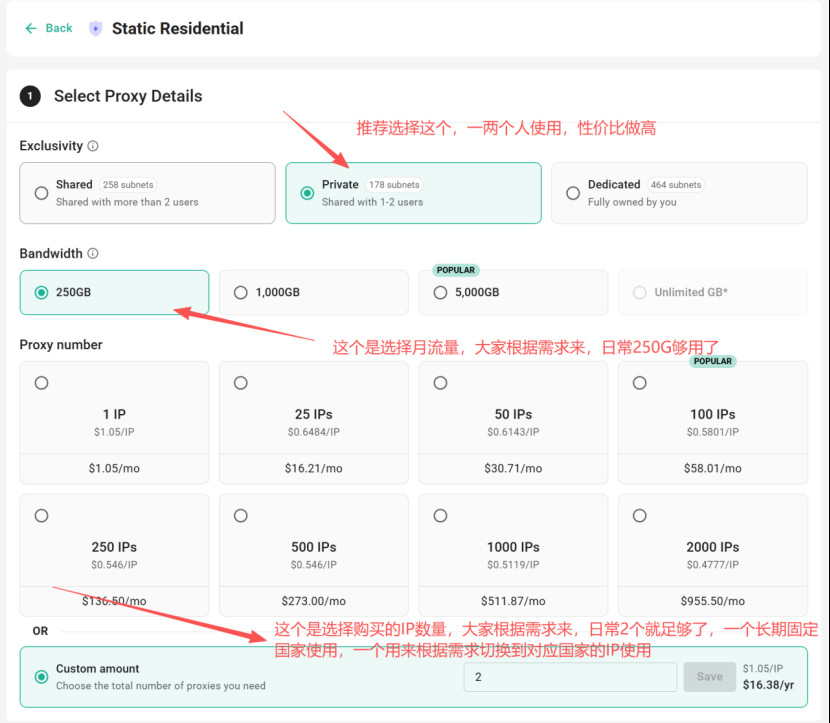
When you buy static residential IPs, the dashboard asks for exclusivity, monthly bandwidth and the number of IPs. The official help centre describes the three exclusivity levels as:
- Shared: used by more customers, and the lowest price.
- Private: shared with at most 0 to 2 other customers.
- Dedicated: assigned only to you, and the highest price. The public dedicated static table starts at 20 IPs at USD 2.10 per IP per month.
One user selected Private, 250GB, and a custom quantity of 2 IPs. On that screen a single IP was listed at USD 1.05 per month, and two IPs were shown at USD 16.38 per year. That is consistent with “USD 16.38 for two IPs for a year” as a checkout total at that moment. It is not a standing official list price, and “USD 1.95 a month with 70% off yearly” should not be copied as a fixed official tariff. Starting quantities and discounts on the public tables should be read from the official pages.
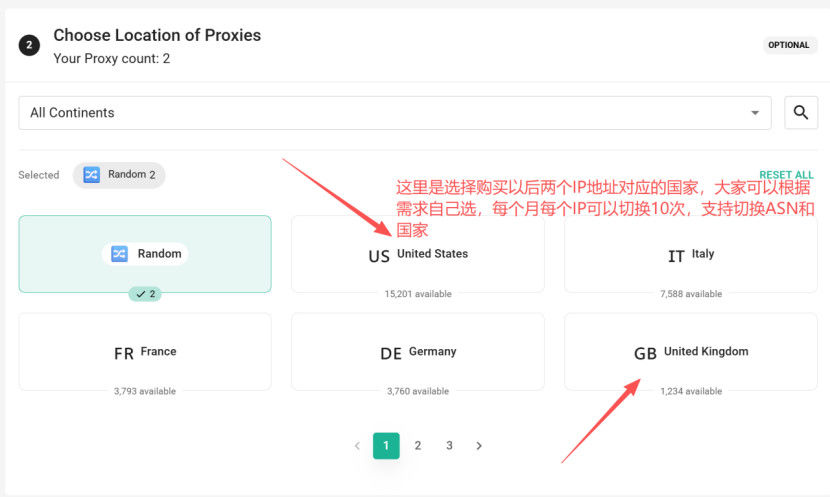
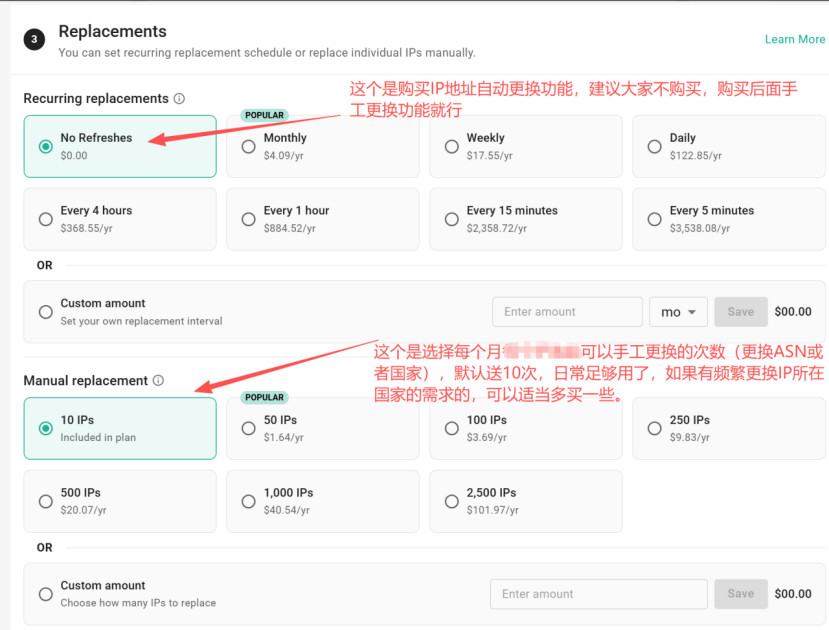
Country or region is chosen in the next step, with availability shown against then-current stock. Some write-ups describe static coverage as “17 countries and 26 ISPs.” This article did not find that pair of figures as a locked official total. The location list is paginated and stock changes; use the list in the dashboard that day. Plans often include a bundle of manual replacements (the screenshot below shows “10 IPs Included in plan”). That is a plan-level allowance, not automatically “10 replacements per IP per month.”
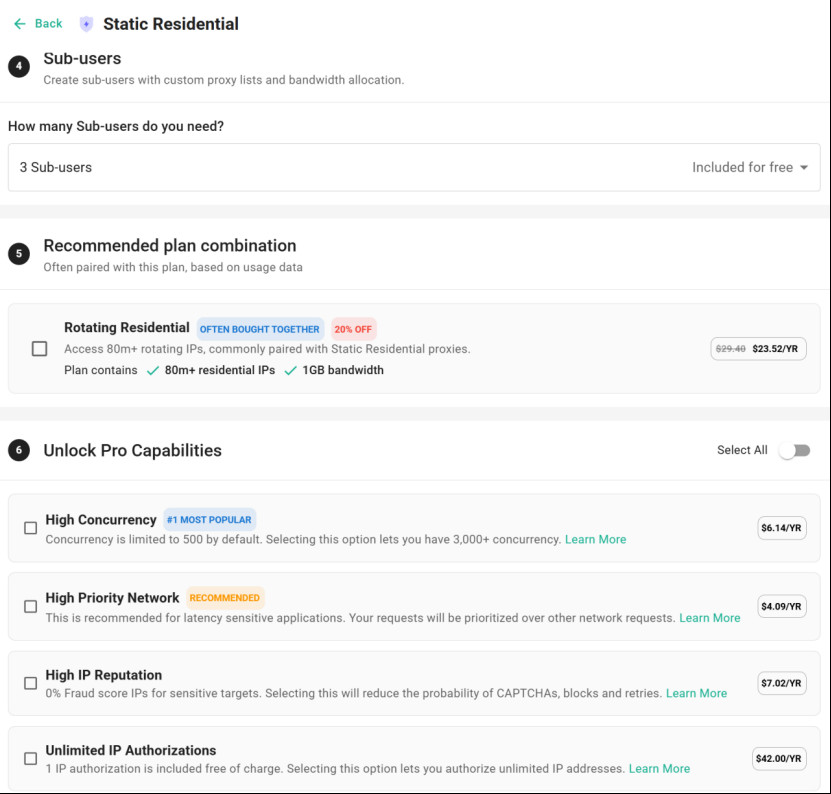
The same flow can add sub-users, a rotating-residential add-on, and extras such as higher concurrency, a high-priority network, higher-reputation IPs and unlimited IP authorisations. Sub-users can be given their own proxy lists and bandwidth; three sub-users are shown as included at no charge, subject to the page that day. The rotating add-on is labelled “80M+ residential IPs,” which again refers to the rotating product, not the static pool. The extras are optional.
Official payment methods include Visa, Mastercard, American Express, Discover, Diners, China UnionPay and JCB, plus Google Pay and Apple Pay on mobile devices. It is not accurate to say the platform “only accepts bank cards.” The official refund policy allows a request to support@webshare.io if you cancel within two days of the original payment, usage is below 1GB on Proxy Server or static residential plans (below 0.1GB on rotating residential), and fewer than 1,000 proxies were used. The full rules are in the official terms.
Plans renew automatically by default. You can manage this in account Settings. Some users report that turning off auto-renew also removes a stored card. This article did not find that sentence on official help pages; follow the prompt in the dashboard.
Replacing IPs and other dashboard settings
After purchase, a single address can be changed with Replace proxy, by country or ASN. Auto-refresh and extra manual replacements can be added at checkout or later.
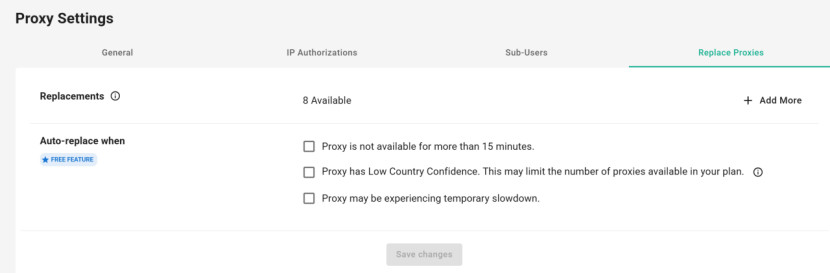
The Replace Proxies tab in Proxy Settings shows how many replacements remain in the current cycle, and optional automatic replacement if a proxy is unavailable for more than 15 minutes, has low country confidence, or slows down temporarily. Some users prefer to leave auto-replace off so the allowance is not used up. That is a preference, not an official requirement.
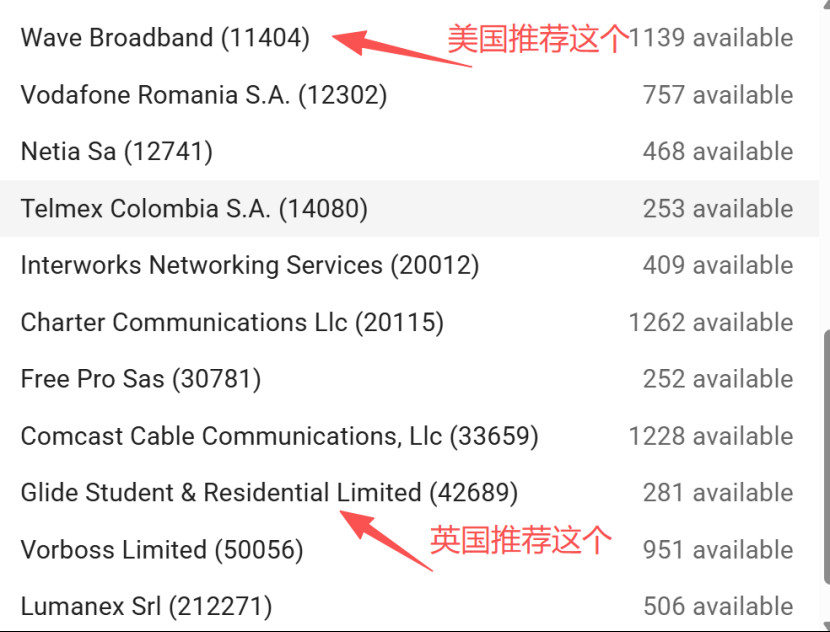
Some users, based on their own experience, prefer Wave Broadband (AS11404) in the United States and Glide Student & Residential Limited (AS42689) in the United Kingdom. Those are individual preferences, not official recommendations. Quality, “cleanliness” scores and whether a target site accepts the address all change.
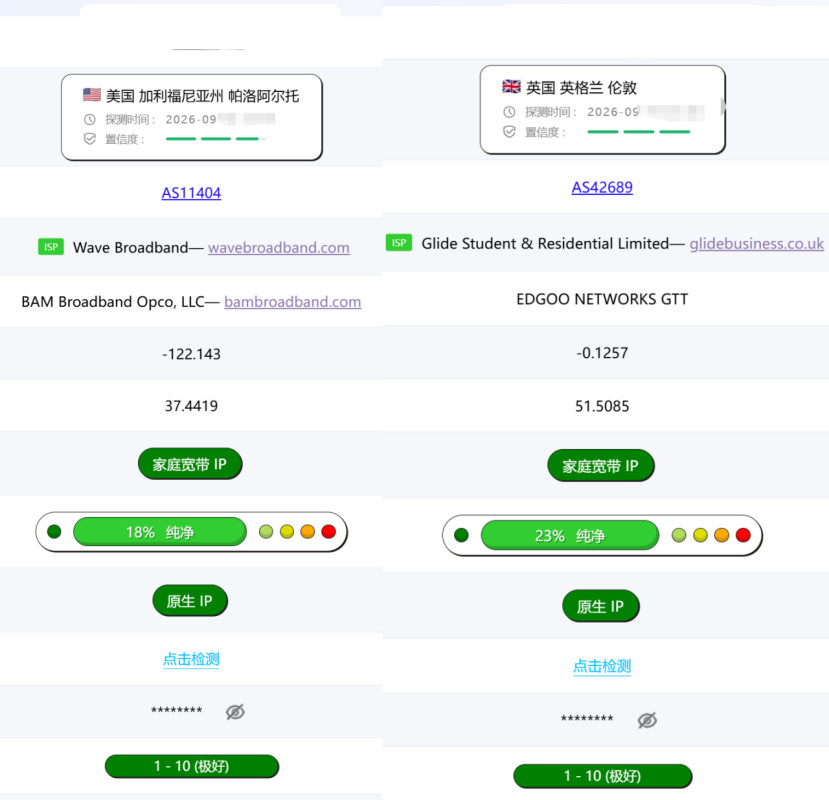
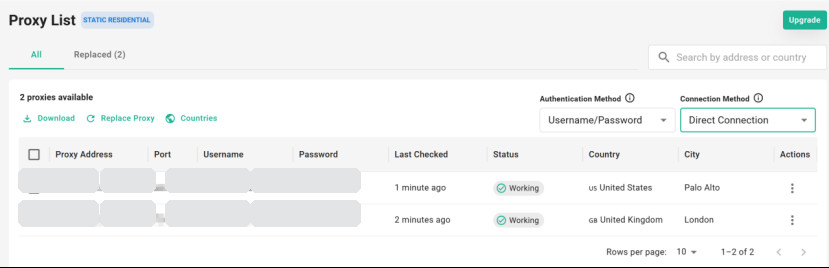
The checker screenshots below come from one user self-test. The tool is not a Webshare product. The two addresses were shown as Palo Alto in the United States and London in the United Kingdom, with “home broadband” / “native IP” labels and the tool’s own scores. Scoring methods differ by tool and do not by themselves prove that an address will work or is “clean.” Addresses, ports and credentials have been masked.
Three connection modes
Official docs and the dashboard split connections into three modes:
- Direct Connection. A conventional list: each proxy is a fixed IP and port, with a username and password (or an IP allow-list). The address does not change on every request. This is usually the mode to use when you want a fixed static-residential egress. Official copy supports HTTP and SOCKS5; whether UDP works depends on the docs and client that day.
- Backbone Connection. A single entry host (commonly described as
p.webshare.ioor another official hostname) with password or allow-list authentication. This is more often used for rotation. Do not assume it is the right mode for a static address; follow official guidance at the time. - Rotating Proxy Endpoint. You do not have to put switching parameters in the username; each request can exit on a new IP. That is a rotating-product pattern, not the way to keep a fixed static address.
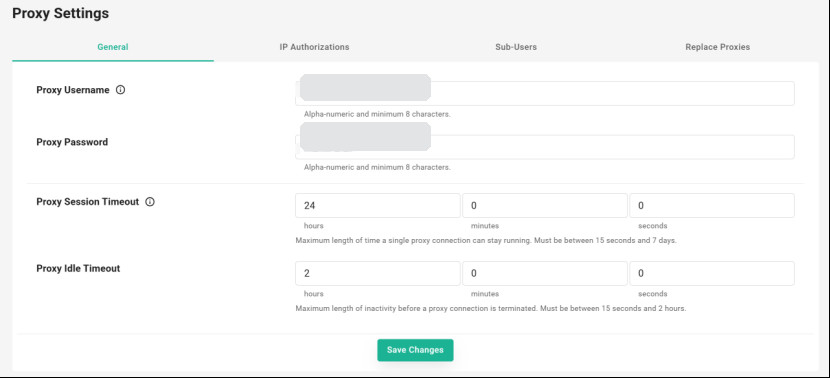
In Proxy Settings you can set a custom proxy username and password (officially alphanumeric, at least 8 characters) and adjust Session Timeout and Idle Timeout. The page states that a session can last between 15 seconds and 7 days, and that idle timeout can last between 15 seconds and 2 hours. One interface had the session set to 24 hours and idle time to 2 hours. The idle value is at the stated maximum; the session value is not at 7 days. Longer is not automatically better; stay inside the official range and whatever your client supports.
On IP authorisations, official extras copy has said that one authorisation is included, with an option to buy more. An allow-list can remove the need for a username and password. Whether that fits your client is a separate question.
Upstream networks and clients
Some users in mainland China report that they cannot reach Webshare’s SOCKS5 endpoints directly and first go through their own upstream proxy, VPN or VPS, then chain to the residential IP. That is an access-path issue, not an official requirement to use a particular VPN provider. This article does not recommend, and does not provide an invite link for, any “airport” or VPN service.
If you already have an upstream network, clients such as Clash Verge and FlClash offer a dialer-proxy / chained-outbound option that can connect to the upstream first and then to a Webshare Direct Connection. Use the fields documented by your client. Do not paste an unknown override script into a config, and do not leave real IPs, ports or passwords in a config you share.
A residential IP does not guarantee that an app or a bank will treat you as a local resident, and it is not a way to avoid those services’ checks on where you actually are, who you are, or where funds come from.
Carddoger takeaway
Webshare’s static residential IPs are ISP proxies priced per address, with country and ASN choices in the dashboard. They are not the same product as bandwidth-priced rotating residential IPs or the free datacenter proxies. Public list prices often start at higher quantities than a custom one- or two-IP configurator, and the official yearly discount should be read from official copy. Do not treat a historical checkout screenshot as a standing official rate.
Before you buy, check shared versus private versus dedicated, bandwidth and the replacement allowance on the official site. After you pay, confirm in Settings whether the plan auto-renews. For a fixed address, start from the Direct Connection list in the dashboard, and register only through the official website. Do not rely on a third-party invite code, and do not treat a residential IP as a tool for opening accounts or avoiding bans.
This article was checked on 14 November 2026 (Beijing time, Asia/Shanghai).