Apple Developer Organization Enrollment with a US LLC: Eligibility, Fees, App Transfers and Tax Forms
Enroll an eligible US LLC with D-U-N-S, domain email, a functional website and binding authority. Covers the USD 99 fee, conversion versus App Transfer, conditi
Sources checked on 7 November 2026 (Asia/Shanghai). This guide is based on official documentation, not a claim that Carddoger personally completed enrollment, payment or a transfer. Approval times and support instructions in the illustrations are individual examples, not Apple commitments.
The short answer
An eligible US LLC can enroll in the Apple Developer Program as an organization. Its legal entity name appears as the App Store seller instead of an individual member's legal name. An LLC is a legal structure, not a single fixed tax classification. Eligibility for organization membership and the correct payment tax form—W-9, W-8BEN or another form—are separate questions.
Existing individual members can contact Apple about conversion to organization membership, or establish separate organization membership and transfer eligible apps. The second route is not guaranteed to be faster, and not every app is transferable. Inventory subscriptions, authentication, iCloud, push notifications and payment capabilities before choosing.
1. Prepare the organization
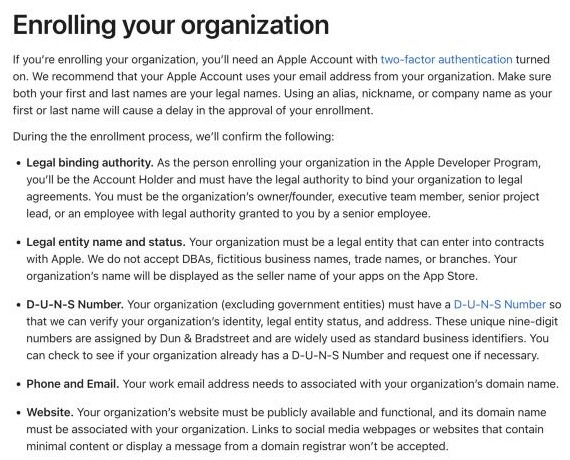
| Item | Requirements and cautions | | --- | --- | | Legal entity | An LLC or another legal entity able to contract with Apple. DBAs, trade names and branches are not accepted. A sole proprietorship does not become an eligible organization merely by using a business name | | D-U-N-S | A nine-digit number registered to that legal entity, with accurate legal status, name and headquarters address | | Apple Account | Two-factor authentication enabled, with the enrolling person's legal first and last names, not a company name or nickname | | Binding authority | The enrolling person must be authorized to bind the organization and becomes Account Holder. Non-founders/owners may need a reference to verify authority | | Work email | Associated with the organization's domain | | Website | Public, functional and substantive, with a domain associated with the organization. Social pages, minimal-content websites and domain parking pages are not accepted | | Documents and budget | Registration documents and, if requested, notarized copies. Budget separately for company compliance, website, email and tax assistance |
A newly created US-region Apple Account is not a stated universal enrollment requirement. The public requirements concern genuine identity, entity status and authority. Supply accurate account and company details, not an invented residence to match a region. A registered-agent address is not automatically an actual headquarters or an owner's tax-residence address.
The following excerpt illustrates the organization requirements; the current official page controls.
2. Check D-U-N-S, then apply
- Follow the lookup link from Apple's official D-U-N-S guidance. Provide the legal entity name, headquarters and mailing addresses, and work contact details.
- If a record already exists, verify its name, address and legal status. If none exists, use the official process to request a free number.
- Apple's guidance allows up to five business days for issuance, then up to two business days for synchronization. This is not an absolute seven-day completion guarantee. If processing exceeds two weeks, follow the guidance to contact D&B.
- If the business is not listed as a legal entity, prepare complete registration documents and ask D&B to investigate or correct its record. Do not misstate your status to bypass checks.
- Submit an organization enrollment with accurate details. Apple may verify binding authority and request further documents, including notarized company records.
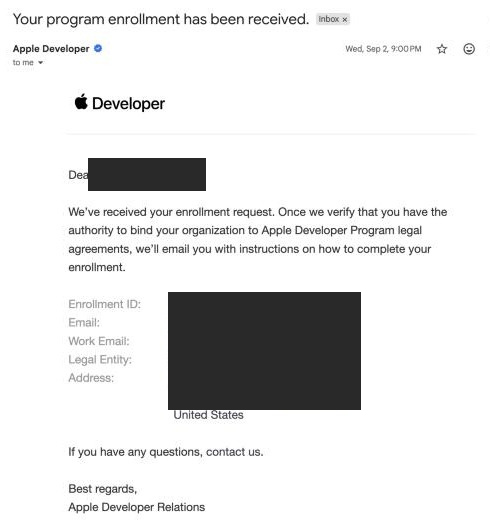
An “enrollment received” email acknowledges receipt; it is not approval or proof that payment is complete. The example below has additional masking over personal and organization identifiers.
How long does approval take?
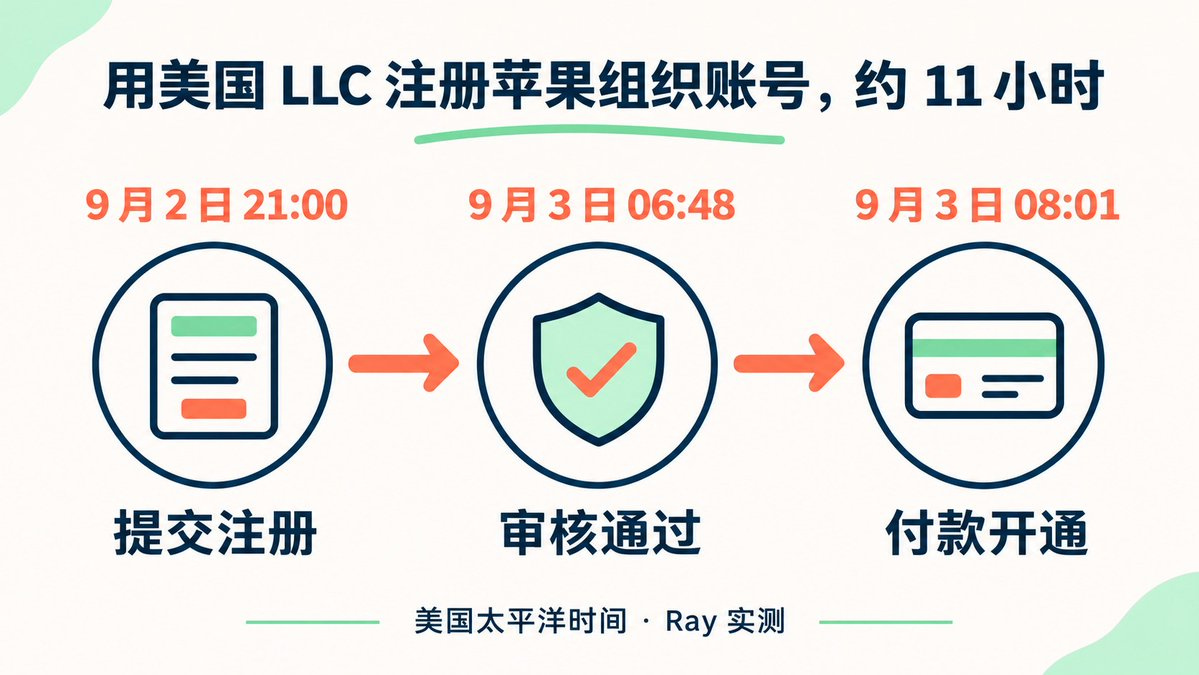
The cited public organization enrollment guidance does not promise a uniform approval period. The approximately 11-hour timeline below describes one well-prepared case, not an expected completion time or service guarantee. Data synchronization, document requests, authority checks and payment can extend the process. Apple advises contacting support with your Enrollment ID if membership confirmation has not arrived within 24 hours after purchase.
The image preserves the case’s original Pacific timestamps. In Asia/Shanghai they are 3 September 2026 at 12:00, 21:48 and 23:01.
3. Membership fees, agreements and payment information
The standard Apple Developer Program fee is USD 99 per membership year, with local pricing where available and applicable taxes. Do not confuse it with the USD 299 Enterprise Program. After organization verification, follow Apple's email to accept the agreement and purchase membership. Payment methods depend on the live checkout; a US-issued bank card is not a universal prerequisite. Enrollment through the Developer app creates an annually renewing subscription.
To sell paid apps or offer Apple In-App Purchases, the Account Holder must also accept the Paid Apps Agreement in App Store Connect → Business → Agreements, then complete banking and tax requirements. The receiving bank account must satisfy Apple's verification for the entity. This guide does not claim that a US bank is always mandatory or that any personal account is acceptable.
The 15% commission requires eligibility and enrollment
Eligible developers can apply for the App Store Small Business Program. Its usual reduced commission is 15% on paid apps and Apple In-App Purchases, subject to approval, applicable agreements and regional terms.
Eligibility uses proceeds of no more than USD 1 million during the relevant 12 fiscal months in the previous calendar year and during the current year. Proceeds are sales net of Apple's commission and certain taxes and adjustments—not simply gross revenue. Associated Developer Accounts under common ownership/control, including individual and company accounts, must be disclosed and considered together. A transferred app's proceeds for that calendar year are associated with all accounts initiating or accepting its transfer. If the current-year threshold is exceeded, the standard commission applies to future sales.
4. Tax forms: verify status before signing a default form
A US LLC may be a single-member disregarded entity or may be treated as a partnership or corporation because of its ownership or tax elections. US incorporation, an EIN, and Apple's organization membership do not individually establish that W-9 is correct.
Common branches, not individualized tax advice:
- A foreign nonresident individual solely owns a disregarded LLC with no corporate tax election: the IRS W-8BEN instructions generally call for the individual owner's own name and information for the appropriate certification. Tell the payer when the receiving account is in the LLC's name; the reference line can help associate the LLC.
- A US tax person: W-9 may be appropriate. Merely having an EIN or ITIN does not make someone a US tax person.
- Foreign entity ownership, a hybrid entity claiming treaty benefits, multiple members or a corporate tax election: do not automatically use an individual's W-8BEN. W-8BEN-E or other documentation may apply.
- Income effectively connected with a US trade or business (ECI): W-8ECI and related rules may apply; nationality alone cannot determine the form.
The permanent residence address on W-8BEN should reflect actual tax residence, not an LLC's registered agent or a mailing-only address chosen to match the developer portal. Treaty benefits depend on tax residency, income type and the treaty's conditions—not simply holding a Chinese passport.
What if the portal only offers W-9?
Apple's public guidance says US-based developers are normally prompted for W-9, while non-US-based developers answer questions leading to W-8BEN, W-8BEN-E or W-8ECI. Contact Apple if the appropriate form is unavailable or information needs correcting. Previously supplied information may remain visible in App Store Connect even after Apple holds updated documentation.
Recommended sequence:
- Establish the owner's status, the LLC's tax classification and the nature of the income; obtain cross-border tax advice when needed.
- Use official App Store Connect support to explain the real facts, such as a US LLC with a foreign owner and disregarded status. Ask which form applies, how owner and company names should be associated, and how address fields should be completed.
- Submit only after receiving account-specific written instructions and confirming you can truthfully make the certifications. Do not knowingly sign an incorrect W-9 merely to activate an agreement, or provide a false US address.
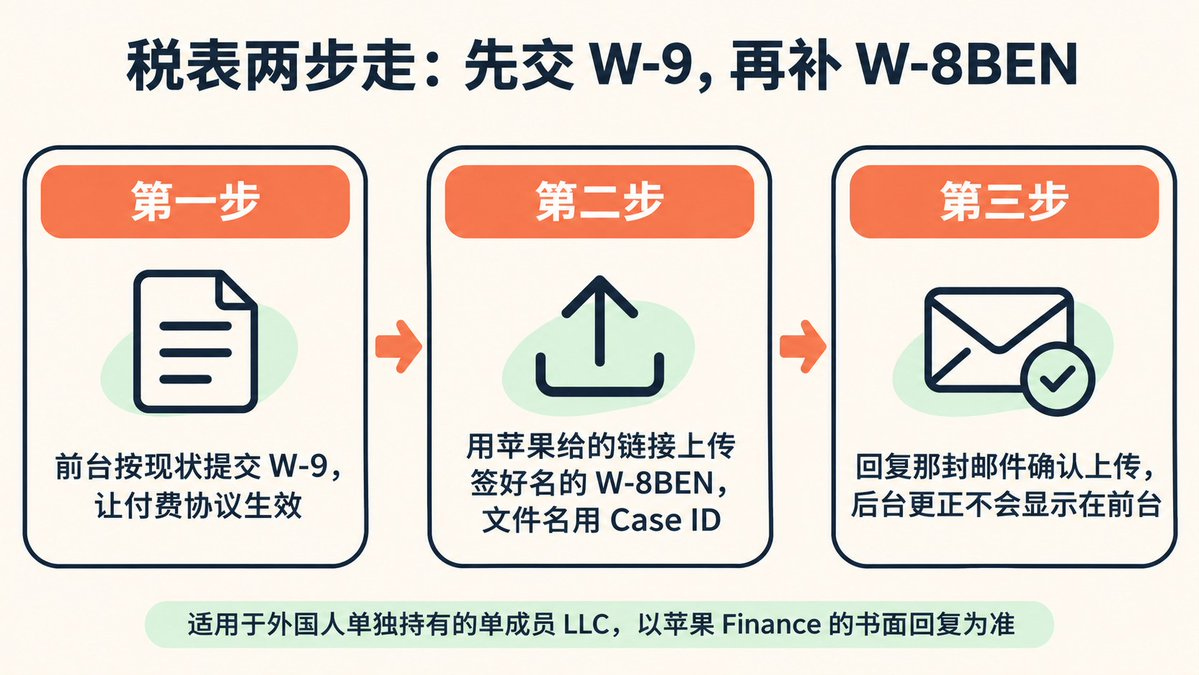
- For corrections, use the secure channel supplied in your own official case. Sign and date the form, follow that case's naming and confirmation requirements, and retain records. Do not reuse another person's upload link or Case ID from a screenshot.
The email below documents a particular correction case, including Active agreement status, filename and reply requirements. It cannot override the IRS's certification or residence-address rules. If account-specific instructions conflict with your real status or tax requirements, seek clarification from Apple Finance.
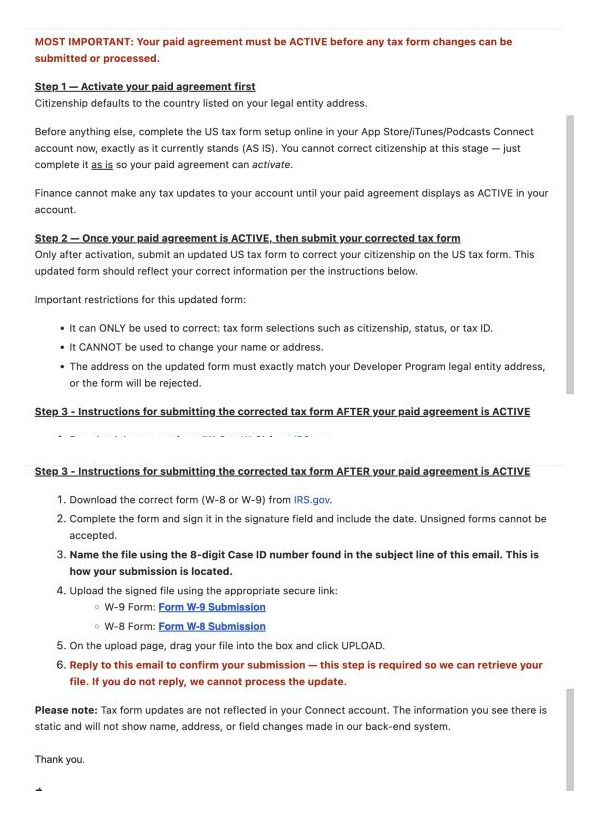
The next graphic's “W-9 first, W-8BEN later” sequence is included only to document a case, not as this guide's recommended steps. Establish the correct form first; account activation is not a justification for a false tax certification.
5. Transfer apps from the individual account
Check eligibility first
- Neither account may be in a pending or changing state. Both parties must accept the latest paid and free agreements.
- At least one app version must have been released on the App Store. The app must not be available for pre-order.
- Restricted statuses include Processing for Distribution, Waiting for Review, In Review, Accepted, Pending Developer Release and Pending Apple Release.
- In-App Purchase products must have eligible statuses and must not duplicate product IDs in the recipient's other apps. Apple-hosted asset packs have review-status restrictions too.
- Apple Arcade apps cannot transfer. Restrictions also apply to sandboxed Mac apps sharing the Application Group Container Directory with other Mac apps.
Technical preparation
Back up metadata, pricing, availability, sales and download records. Then review the app's actual capabilities:
- TestFlight: disable testing for every beta version, remove builds and testers, and clear Test Information for every localization.
- Auto-renewable subscriptions: prepare an app-specific shared secret and exchange it through an authorized secure channel. Update receipt-validation services. After completion, the recipient should generate a new app-specific secret. Never publish it in a guide or screenshot.
- Sign in with Apple: generate user transfer identifiers following the official process. Ungroup grouped apps and check Service ID handling.
- Xcode Cloud: remove the app's related data before initiating transfer.
- Push notifications, keychain, Wallet, Apple Pay, iCloud and Game Center: review certificate, Team ID, container and configuration changes. Transferring a shared CloudKit container can remove other apps' access.
Initiate and accept
- The transferor's Account Holder opens App Store Connect → Apps → the app → General → App Information → Additional Information → Transfer App.
- Review eligibility, enter the recipient Account Holder's Apple Account and Team ID, review the terms and request the transfer.
- The recipient Account Holder has 60 days to accept before expiration. While pending, the transferor cannot edit certain metadata, pricing, availability or In-App Purchases.
- After acceptance, validate login, subscriptions, push, payments, cloud data and future signing/release workflows. Acceptance alone does not complete all engineering migration work.
What moves, stays behind or needs reconfiguration?
| Item | Official behavior | | --- | --- | | Bundle ID, associated App ID, reviews and ratings | Move with the app; users can continue downloading and receiving updates | | Sales and Trends; Payments and Financial Reports | Pre-transfer transactions remain with the transferor; the recipient receives post-transfer sales and payment information | | App Analytics | The transferor loses access. The recipient gains historical analytics from 1 April 2015 or the app's initial release, whichever is later. It is incorrect simply to say analytics do not transfer | | iCloud and webhooks | Associated data/configuration transfers as documented; shared containers can affect other apps, and webhook destinations should be reviewed | | Apple Pay merchant ID | Does not transfer; create an appropriate merchant ID in the recipient account when updating the app | | Game Center matchmaking | Does not transfer; the recipient must recreate or adjust rules |
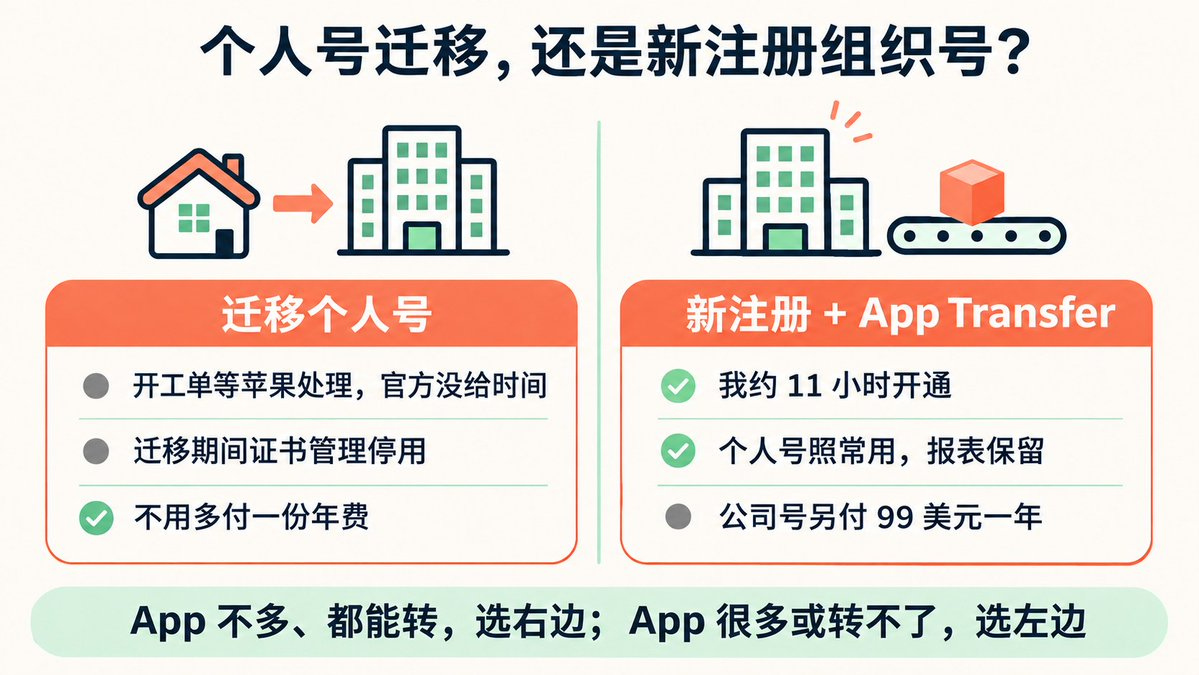
6. Convert membership, or open an organization and transfer?
Convert the individual membership: contact Apple through official support. Obtain account-specific confirmation of eligibility, timing, certificate access, reporting and settlement effects. Another developer's support case is not a universal policy.
Separate organization membership plus App Transfer: the organization pays for its membership separately, while the individual account must remain maintained for as long as it is still needed. This can suit a small number of transferable apps with simpler dependencies. Complex subscriptions, shared containers and restricted apps require more analysis than a promise of speed. A separate Apple Account can help management separation, but a US account is not a substitute for organization eligibility.
The graphic below includes case-specific claims about speed, certificate downtime and reports. Rely on the official criteria and your own support instructions, not a promise of the same outcome.
Carddoger summary
Prepare accurate, consistent entity records, D-U-N-S, website, domain email and binding authority before applying. After approval, handle agreements, banking and tax documentation. For existing apps, assess transfer criteria and technical dependencies before choosing conversion or separate organization enrollment. Keep the USD 99 membership fee, the conditional 15% commission, LLC status and tax-form selection separate. Never sign an incorrect tax form to obtain “fast activation.” This is not legal or tax advice.
Official references
- Apple Developer Program eligibility and fees
- Enrollment, verification, payment and individual-to-organization conversion
- D-U-N-S lookup and processing guidance
- App Store tax information and corrections
- App Store Small Business Program
- App transfer overview and capability considerations
- App transfer criteria
- Initiate an app transfer
- IRS W-8BEN instructions
- IRS instructions for requesters of W-9