Germany O2 eSIM Guide: €4.99 with €5 Credit, No Monthly Fee, Keep It Alive via Wise
O2 Germany's prepaid Basistarif: €4.99 with €5 credit, no monthly fee, no contract, eSIM supported, verified online with passport NFC and a video selfie. Screen
What this covers
We wanted a long-term foreign number for services that require phone verification, such as ChatGPT / Codex. A Hong Kong CSL SIM didn't pass, so we went with Germany's O2 prepaid eSIM (O2 Prepaid Basistarif). In October 2026 we ran the full flow on the current pages: online order, passport NFC verification, eSIM install, blocking unwanted charges, and keeping the number alive with Wise scheduled transfers.
| Item | Details | |---|---| | Activation | One-off €4.99 | | Starting credit | €5 included | | Monthly fee | €0 | | Contract | No minimum term | | Number | Regular German carrier number | | eSIM | Yes, no physical SIM to wait for | | Keeping it | At least one successful top-up every 6 months | | Network | 5G, optional data packs, EU roaming where eligible |
Before you start
- Passport for ID verification; name and date of birth must match it exactly.
- An NFC phone to read the passport chip.
- An eSIM device: a phone with native eSIM, or an adapter like 9eSIM, XeSIM etc. (check compatibility first).
- Payment: Visa / Mastercard or PayPal.
- Email and a German address; a German address generator works.
- Network: the O2 site blocks US IPs; use a non-US connection.
- Pages are in German; use browser translation. The 0€ shown is the monthly fee, not a free activation.
Steps
1. Choose the Basistarif
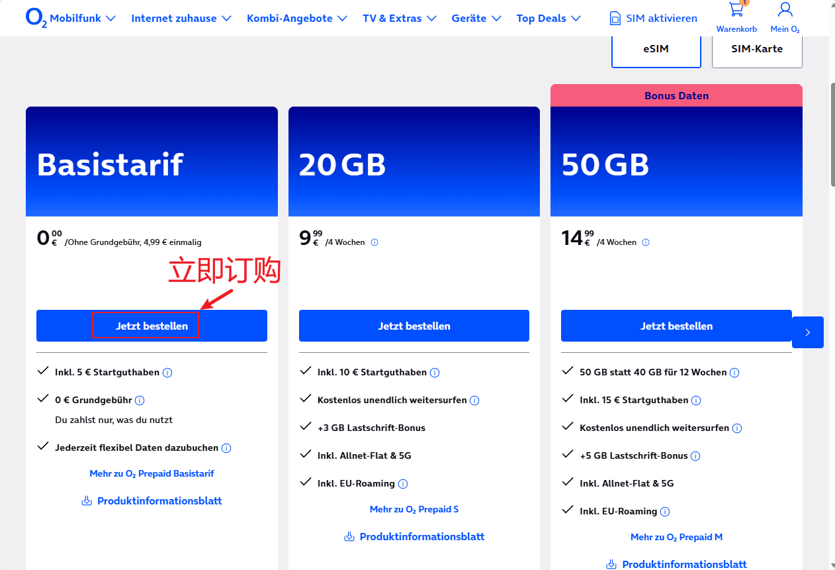
Open https://www.o2online.de/mobilfunk/prepaid/esim/ , choose eSIM, find Basistarif and click Jetzt bestellen (order now). The other plans bundle data and minutes; the basic plan is enough to keep a number.
2. Skip online protection
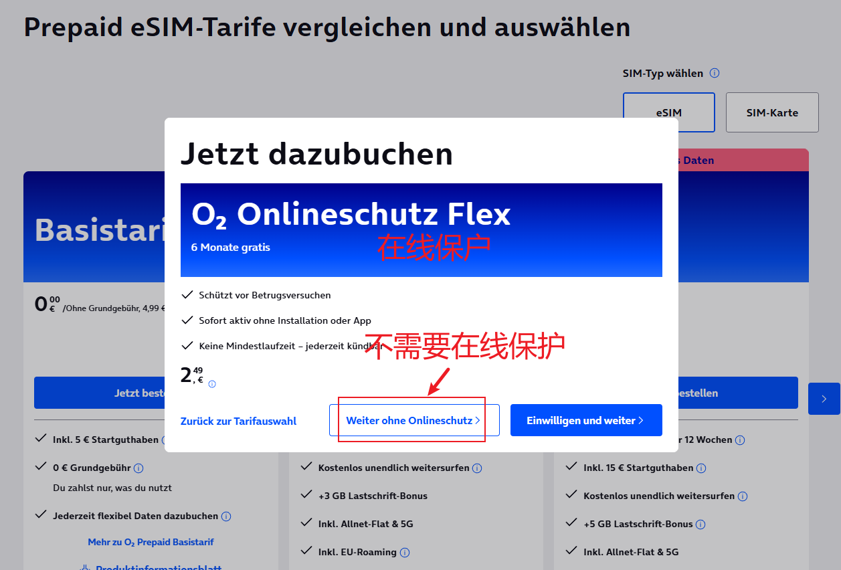
An O2 Onlineschutz Flex pop-up appears: free for a few months, then €2.49 per period. Click Weiter ohne Onlineschutz (continue without it).
3. Personal details
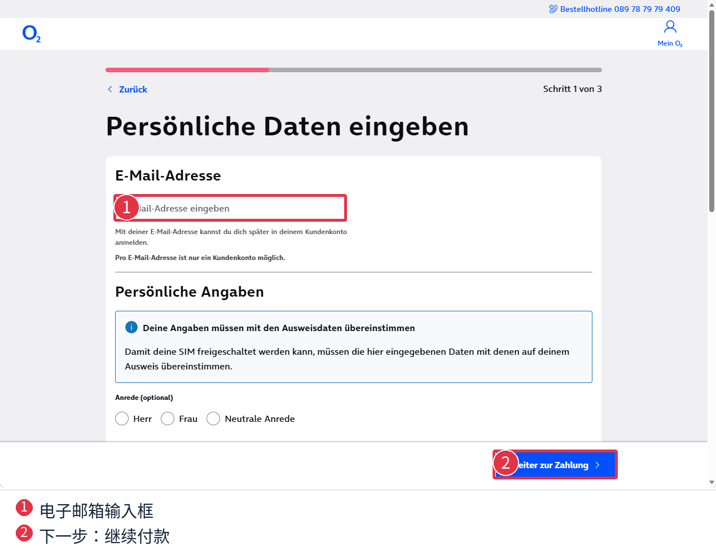
On Persönliche Daten eingeben, enter your email, then title and name exactly as on your passport.
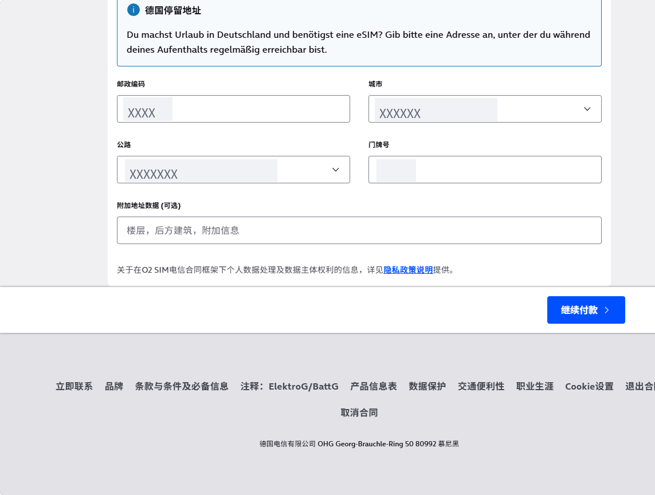
Then the address: Postleitzahl (postcode), Ort (city), Straße (street), Hausnummer (house number). Click Weiter zur Zahlung (continue to payment).
4. Payment method
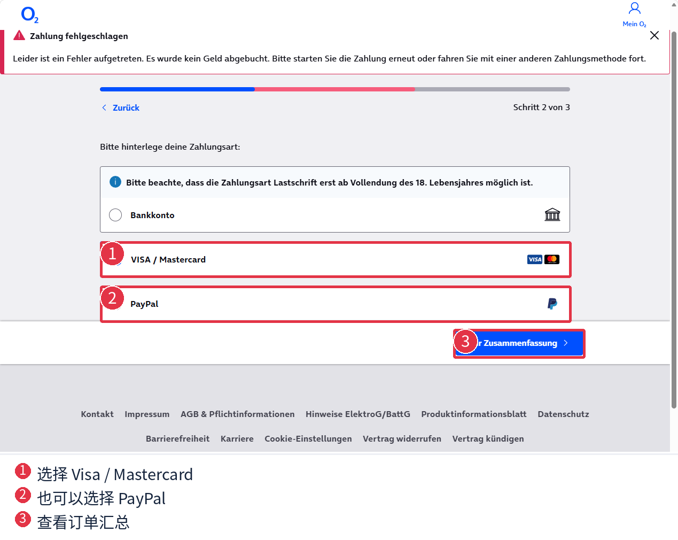
Choose VISA / Mastercard or PayPal. If you see Zahlung fehlgeschlagen (payment failed), check that your card allows foreign online payments or try the other method.
5. Review and order
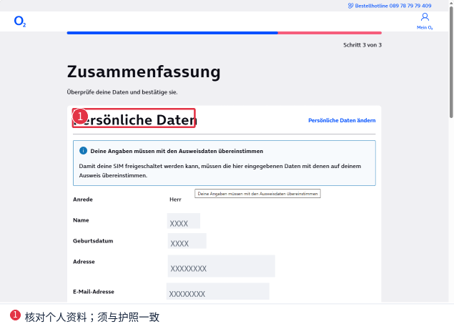
On Zusammenfassung (summary), check your details match your passport and that no paid add-ons are selected.
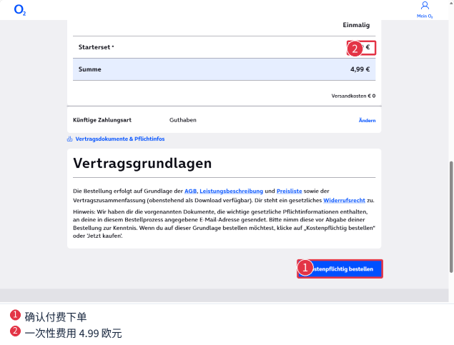
Confirm the one-off €4.99 and click Kostenpflichtig bestellen (order with obligation to pay).
6. Choose online ID verification
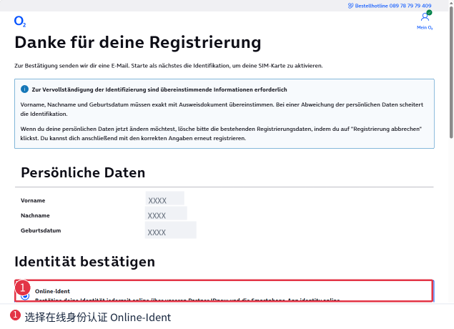
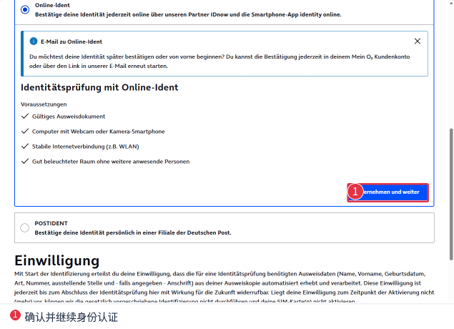
After ordering you'll see Danke für deine Registrierung. Under Identität bestätigen choose Online-Ident.
Click Übernehmen und weiter.
7. Get the verification QR code (keep the page open)
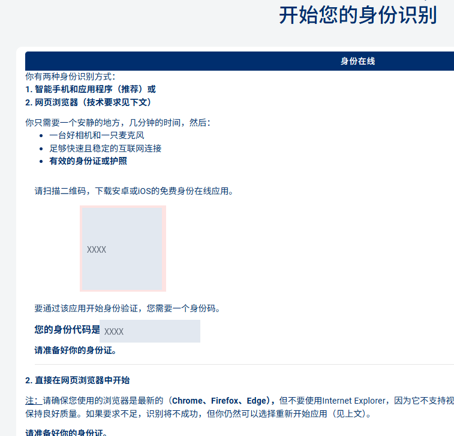
The page shows a QR code and an ID code for the phone app. Keep this page open and don't share the code.
8. Install identity online and scan
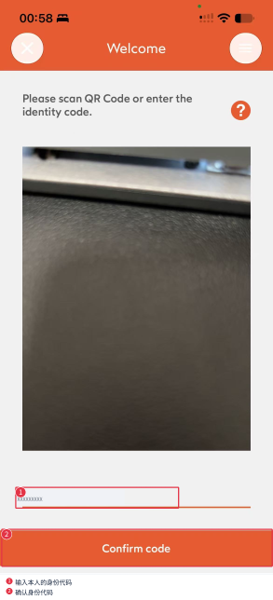
Install the identity online (IDnow) app and scan the QR code, or type in the ID code.
9. Read the passport chip by NFC
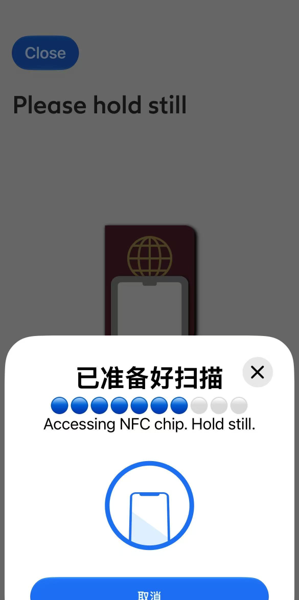
Photograph the photo page, then hold the phone's NFC area against the passport without moving until it finishes. If it fails, shift the phone slightly.
10. Video selfie
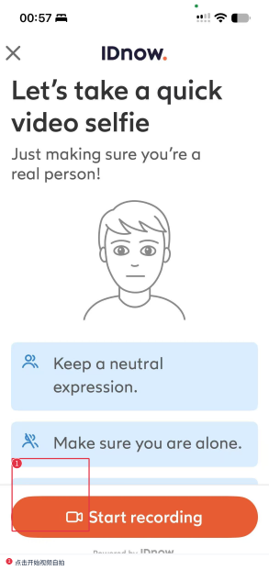
Good light, neutral expression, nobody else around; tap Start recording and follow the prompts. About 2 minutes later our page jumped to the O2 eSIM activation QR code; keep it open too. If you close it, no need to reorder: log in at https://login.o2online.de/ and find it under eSIM management.
11. Install the eSIM
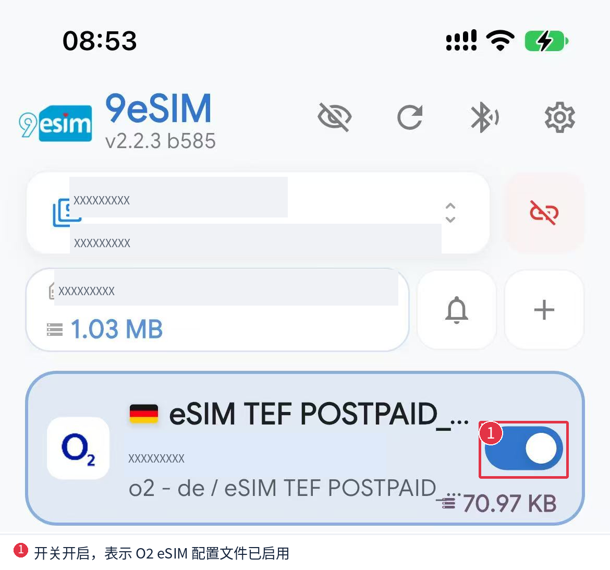
Turn off mobile data and use Wi-Fi to avoid roaming charges. On a native-eSIM iPhone: Settings → Cellular → Add eSIM and scan the code; Android varies by brand. We used a 9eSIM adapter: write the O2 profile to it, then enable it in the 9eSIM app. A welcome SMS from O2 arrives shortly after.
12. Get bank transfer top-up details
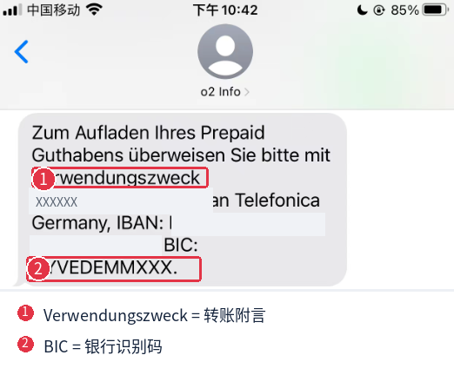
O2 accepts bank-transfer top-ups using the IBAN, BIC and Verwendungszweck (payment reference that identifies your number). Turn on WiFi Calling on your phone before sending the text, otherwise this SMS can cost you about €4.7. With it on, we texted IBAN to 56656:
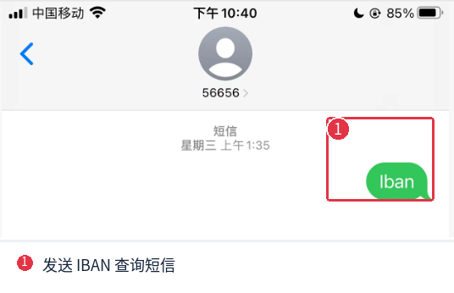
The reply contains the transfer details. Use your own reference; a wrong one means the money won't reach your account.
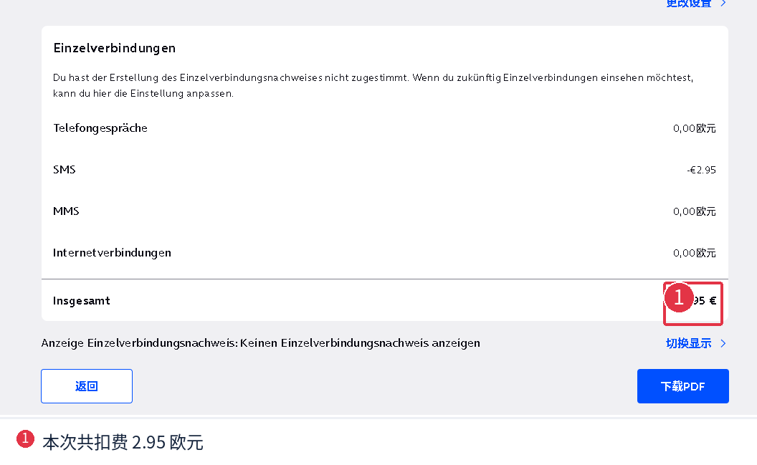
13. Watch for a €2.95 charge
Afterwards our bill showed a €2.95 charge under SMS. It came from sending the IBAN text without WiFi Calling on, so turn WiFi Calling on first in step 12. Check your bill regularly and look into any unknown charge.
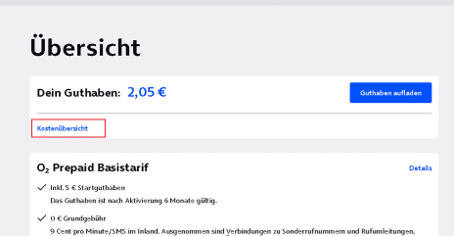
14. Open the charge settings in Mein O2
Log in at https://login.o2online.de/ ; Übersicht (overview) shows your balance and plan.
Scroll to Abbuchungen & Gebühren (charges and fees) and click Einstellungen ändern (change settings).
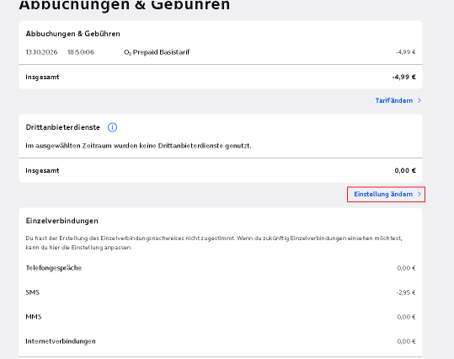
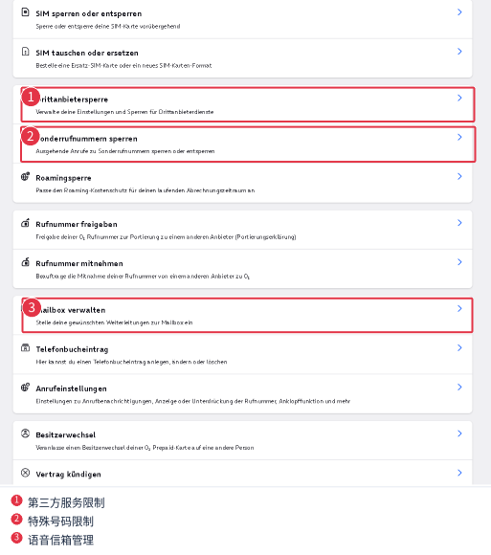
For a low-use number focus on three: Drittanbietersperre, Sonderrufnummern sperren and Mailbox verwalten. Leave Vertrag kündigen (cancel), SIM sperren (block SIM) and Rufnummer mitnehmen / freigeben (porting) alone.
15. Block third-party billing
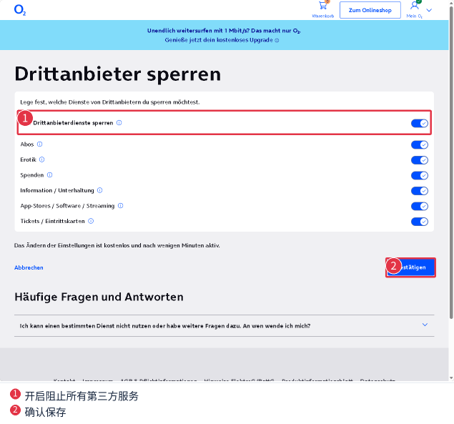
In Drittanbietersperre, turn on Alle Drittanbieterdienste sperren (block all third-party services) and save.
16. Block premium numbers
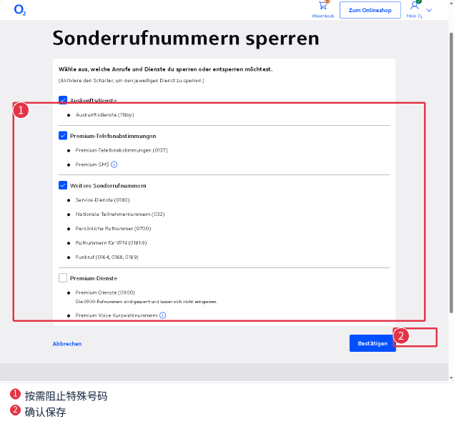
In Sonderrufnummern sperren, tick the premium categories to block and click Bestätigen. If you only receive codes, block them all.
17. Turn off voicemail forwarding
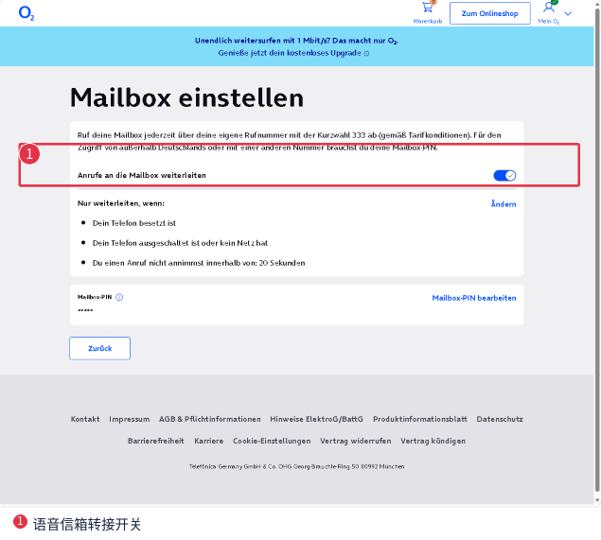
In Mailbox verwalten, turn off Anrufe an die Mailbox weiterleiten (forward calls to voicemail).
18. Keep the number alive with Wise
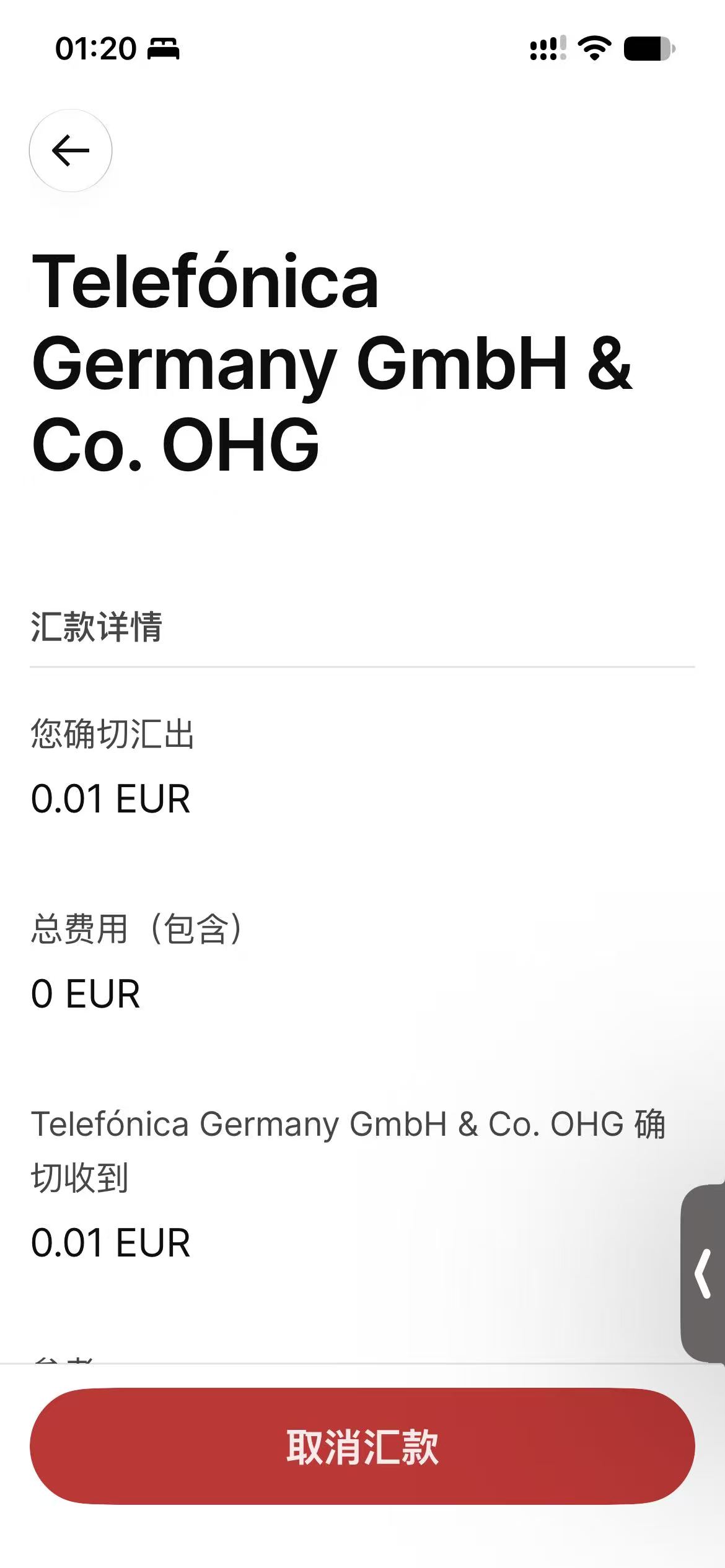
O2 needs at least one successful top-up every 6 months. We set a quarterly scheduled transfer in Wise (Open / More → Automations → Scheduled transfers), leaving room to fix a failed payment.
| Wise field | Value | |---|---| | Recipient | Telefónica Germany GmbH & Co. OHG | | IBAN | The account O2 sent you by SMS | | BIC | HYVEDEMMXXX (use what you received) | | Verwendungszweck / reference | Your number's own top-up reference | | Currency | EUR | | Amount | €0.01 |
The reference must match exactly. If Wise has a minimum or the fee exceeds the top-up, use a workable amount instead. Test the first one: once it lands, check in Mein O2 that the balance and validity updated.
Carddoger summary
O2 Prepaid Basistarif is one of the best long-term German numbers right now: €4.99 including €5 credit, no monthly fee, no contract, fully online with passport NFC and a video selfie, and eSIM support. Once you have it, block third-party billing, premium numbers and voicemail, check your bill now and then, save your own transfer reference, and top up a small amount quarterly via Wise, confirming each one lands. Prices and steps may change; O2's site has the final word.
Links: O2 prepaid https://www.o2online.de/mobilfunk/prepaid/ ; O2 top-up help https://hilfe.o2online.de/o2-prepaid-128/o2-prepaid-so-kann-ich-guthaben-aufladen-abfragen-und-auszahlen-648833 ; Wise scheduled transfers https://wise.com/help/articles/2978063/what-are-scheduled-transfers