How to Get a German Tax ID (Steuer-ID) From Abroad: Form 010250 and ELSTER Submission
Apply for a German Steuer-ID from abroad, following Humboldt-Universität zu Berlin's published process: fill in BZSt form 010250 field by field, upload it with
What this covers
The German tax ID, Steuer-ID (officially Identifikationsnummer, IdNr), is an 11-digit number issued by the Federal Central Tax Office (BZSt). It is permanent and does not change when you move, change your name, or marry.
People who do not live in Germany may still need one. Humboldt-Universität zu Berlin's Faculty of Mathematics and Natural Sciences gives a typical case: when the university reimburses a foreign guest's conference travel, it must report that person's Steuer-ID to the tax authorities, even if they live abroad.
Following HU Berlin's published process, this guide shows how to apply for a Steuer-ID online from abroad: fill in BZSt form 010250, then upload it to a Berlin tax office through ELSTER's non-tax message form. Fields and pages change, so BZSt and ELSTER's official pages take priority.
Before you start
| Item | Notes | |------|------| | Passport | A PDF scan of the photo/data page | | Address abroad | Your full foreign address | | Phone | With country code, for queries | | Email | Needed when submitting on ELSTER | | Signature | Digital signatures are not accepted; sign by hand and scan, or insert a signature image into the PDF |
- The pages are in German; your browser's translate feature helps
- Uploads must be PDF, 10 MB max each
- The Steuer-ID is sent by post only and can take several weeks
- State your real reason. The example below is HU Berlin's conference reimbursement case; fill in your own situation otherwise
Steps
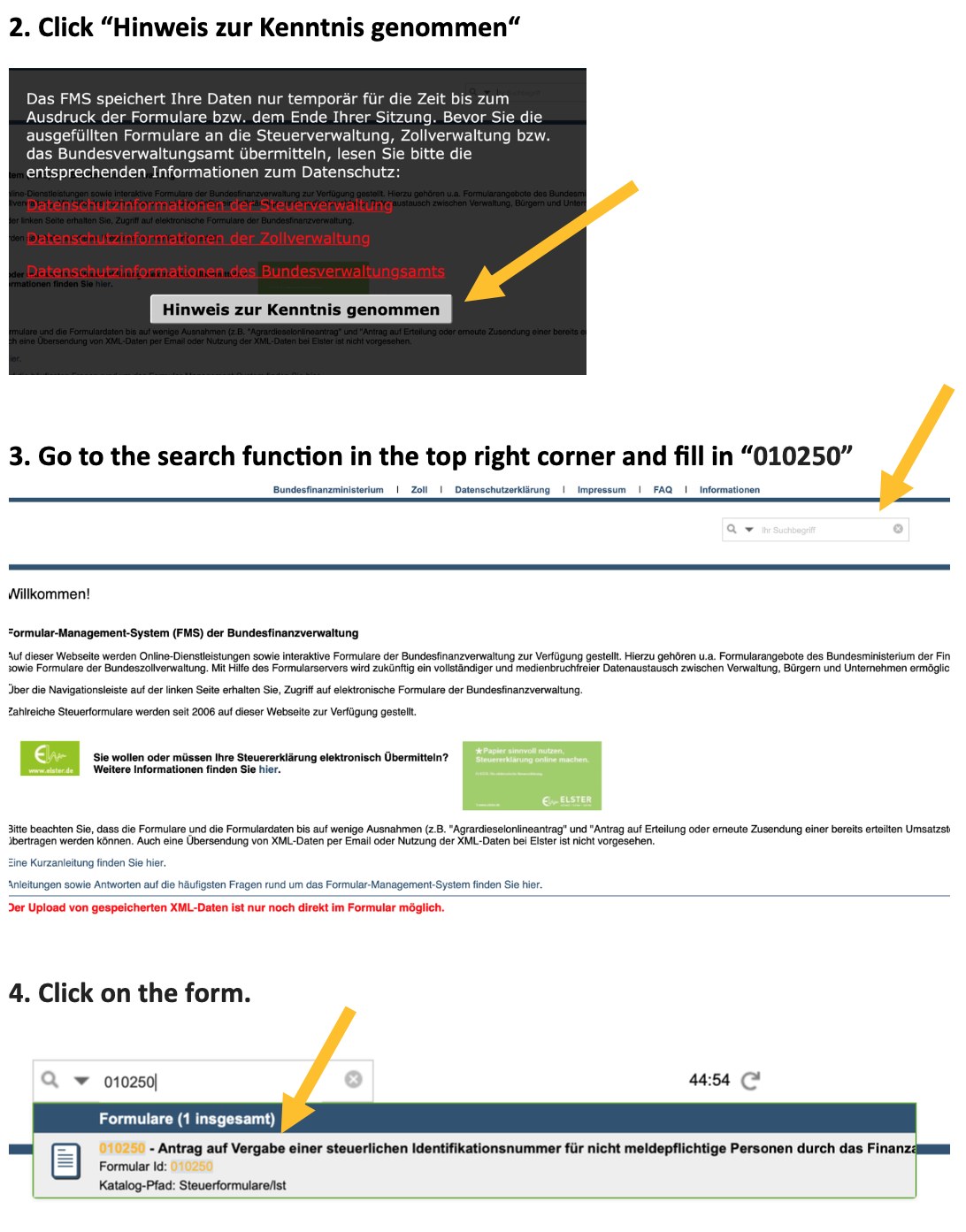
1. Open the form portal and find 010250
- Go to the federal finance forms center
- Tick "Hinweis zur Kenntnis genommen" (notice acknowledged)
- Type 010250 in the search box at the top right
- Open the form from the list
2. Personal details
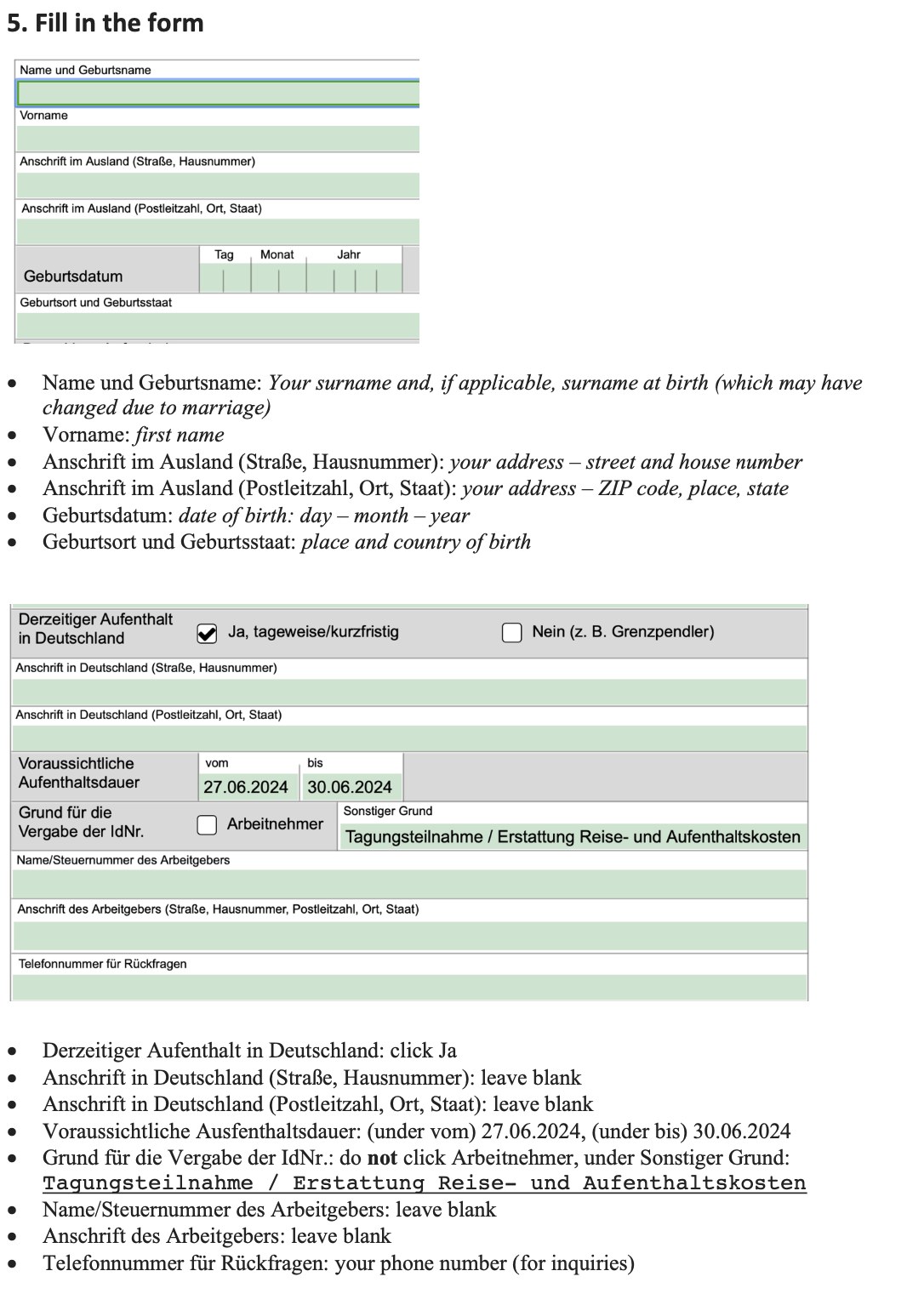
| Field | Enter | |------|------| | Name und Geburtsname | Surname, plus birth surname if it changed | | Vorname | First name | | Anschrift im Ausland (Straße, Hausnummer) | Foreign address: street and number | | Anschrift im Ausland (Postleitzahl, Ort, Staat) | Foreign address: postcode, city, country | | Geburtsdatum | Date of birth, day-month-year | | Geburtsort und Geburtsstaat | Place and country of birth |
3. Stay in Germany
| Field | Enter | |------|------| | Derzeitiger Aufenthalt in Deutschland | Tick "Ja, tageweise/kurzfristig" (yes, short-term / by the day) | | Anschrift in Deutschland | Leave both lines blank | | Voraussichtliche Aufenthaltsdauer | Expected length of your stay |
4. Reason and contact
| Field | Enter | |------|------| | Grund für die Vergabe der IdNr. | Do not tick "Arbeitnehmer" (employee) | | Sonstiger Grund | HU conference example: "Tagungsteilnahme / Erstattung Reise- und Aufenthaltskosten" (conference attendance / reimbursement of travel and accommodation) | | Employer name / tax number, employer address | Leave blank | | Telefonnummer für Rückfragen | Phone with country code |
5. Optional: send the ID straight to the institution
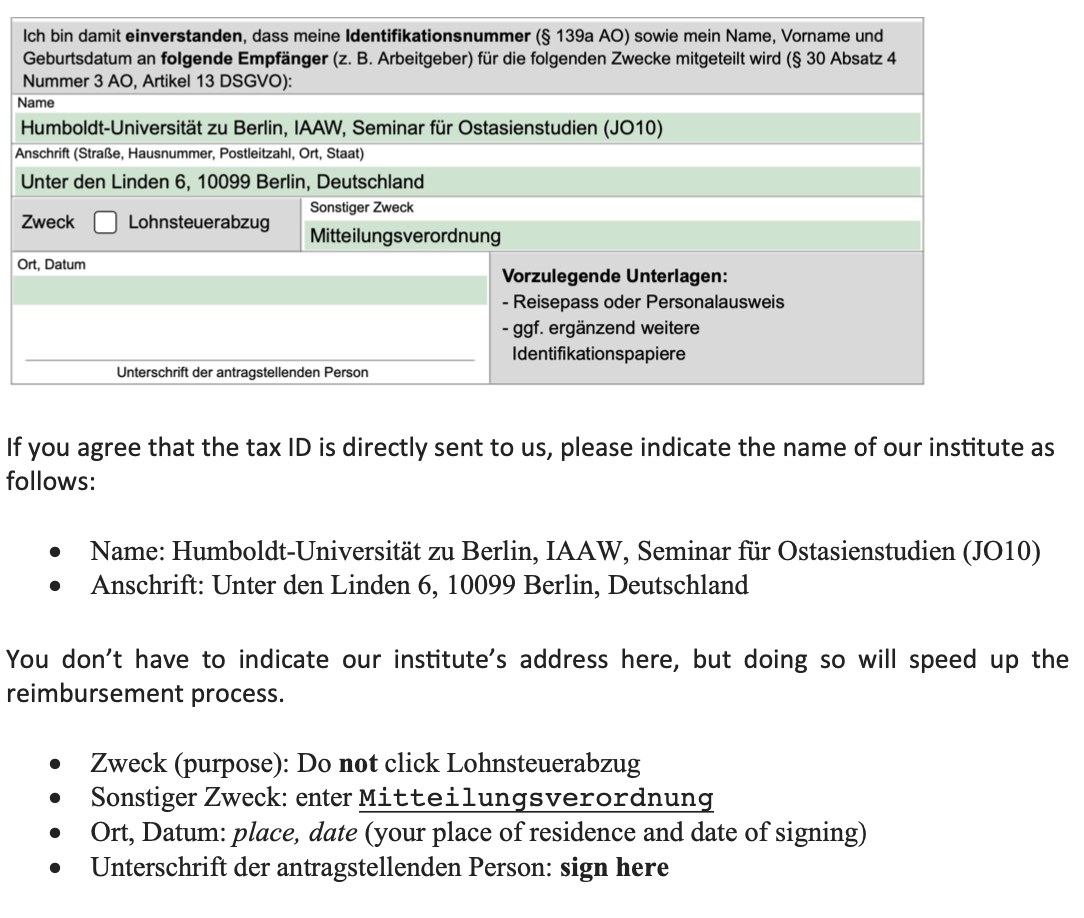
You can have the Steuer-ID sent directly to the institution that needs it. HU says this is optional but speeds up reimbursement. HU's example:
| Field | Enter | |------|------| | Name | "Humboldt-Universität zu Berlin, NAME OF YOUR INSTITUTE" | | Anschrift | "Unter den Linden 6, 10099 Berlin, Deutschland" | | Zweck | Do not tick "Lohnsteuerabzug" (wage tax withholding) | | Sonstiger Zweck | "Mitteilungsverordnung" (notification regulation) |
6. Sign and save the PDF
Fill in "Ort, Datum" with your place of residence and date, then sign under "Unterschrift der antragstellenden Person".
Digital signatures are not accepted: add an image of your handwritten signature with a PDF editor, or print, sign, and scan.
7. Submit on ELSTER
- Open ELSTER's non-tax message form; no ELSTER account needed
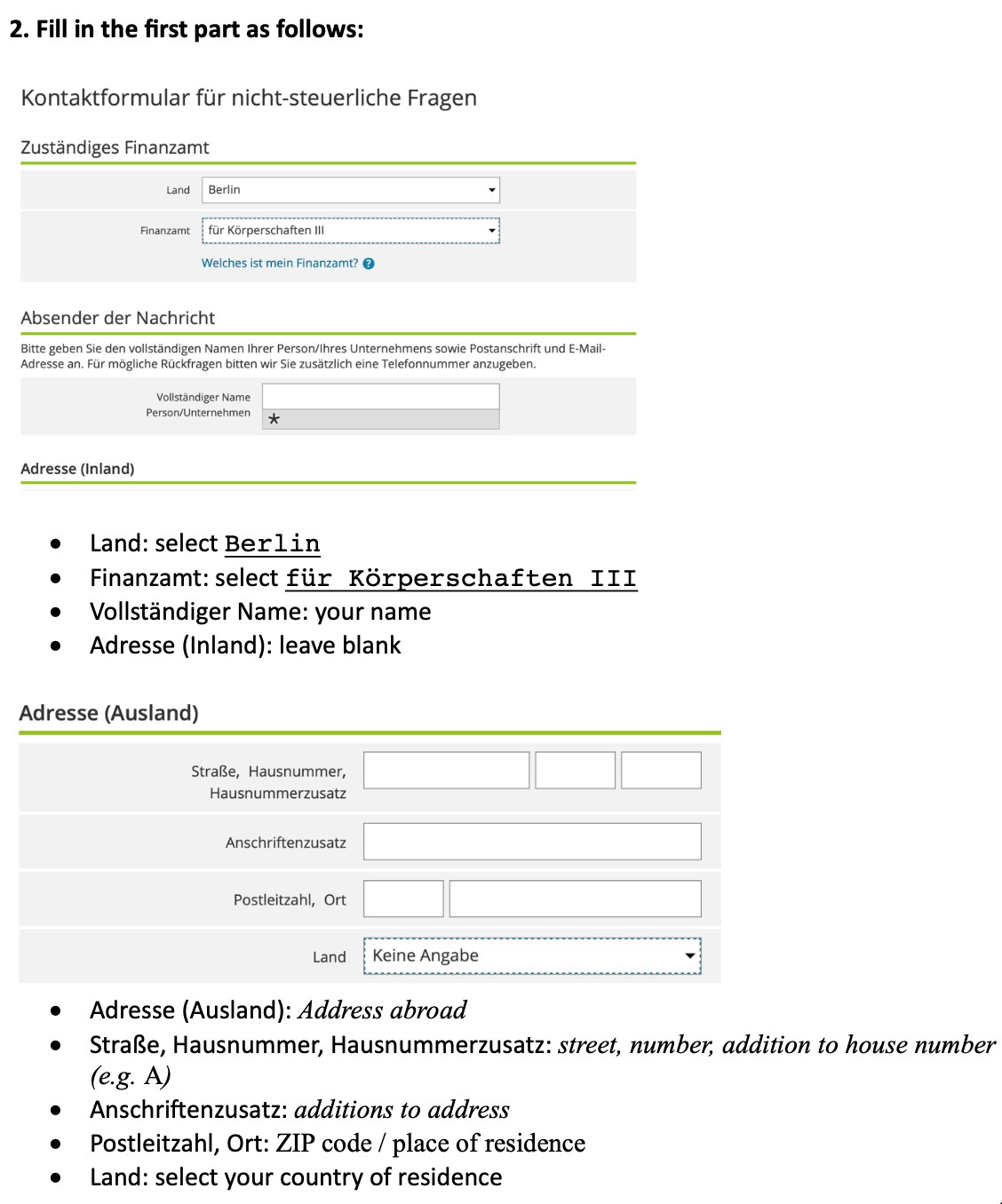
- Set "Land" to Berlin and "Finanzamt" to für Körperschaften III
- Enter your full name; leave "Adresse (Inland)" blank; fill "Adresse (Ausland)" with street and number, address addition, postcode and city, and pick your country under "Land"
- Add phone and email
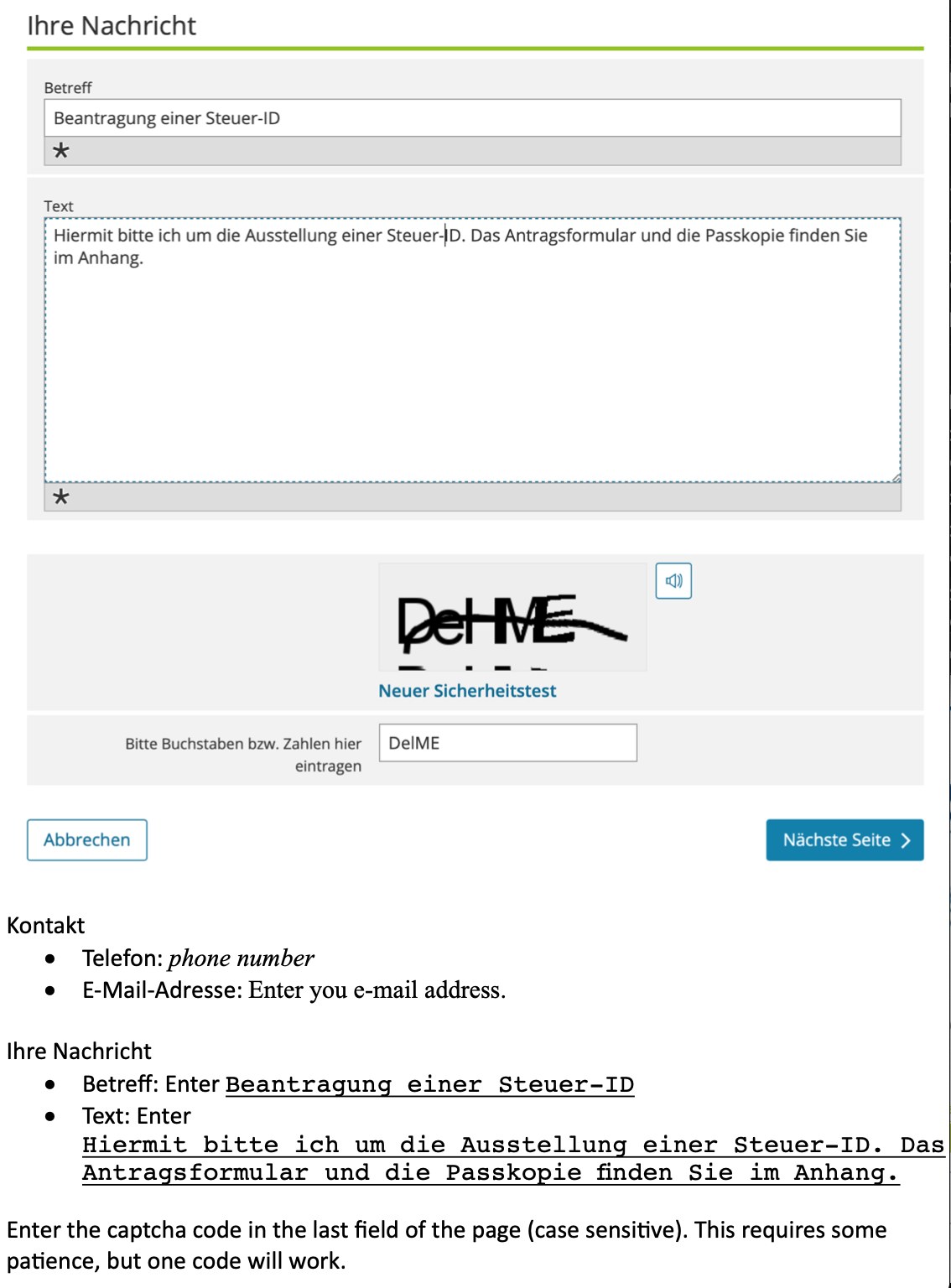
- "Betreff" (subject): Beantragung einer Steuer-ID
- "Text": Hiermit bitte ich um die Ausstellung einer Steuer-ID. Das Antragsformular und die Passkopie finden Sie im Anhang. (I hereby request a Steuer-ID. The application form and passport copy are attached.)
- Enter the case-sensitive captcha at the bottom. It may take a few tries
8. Upload and send
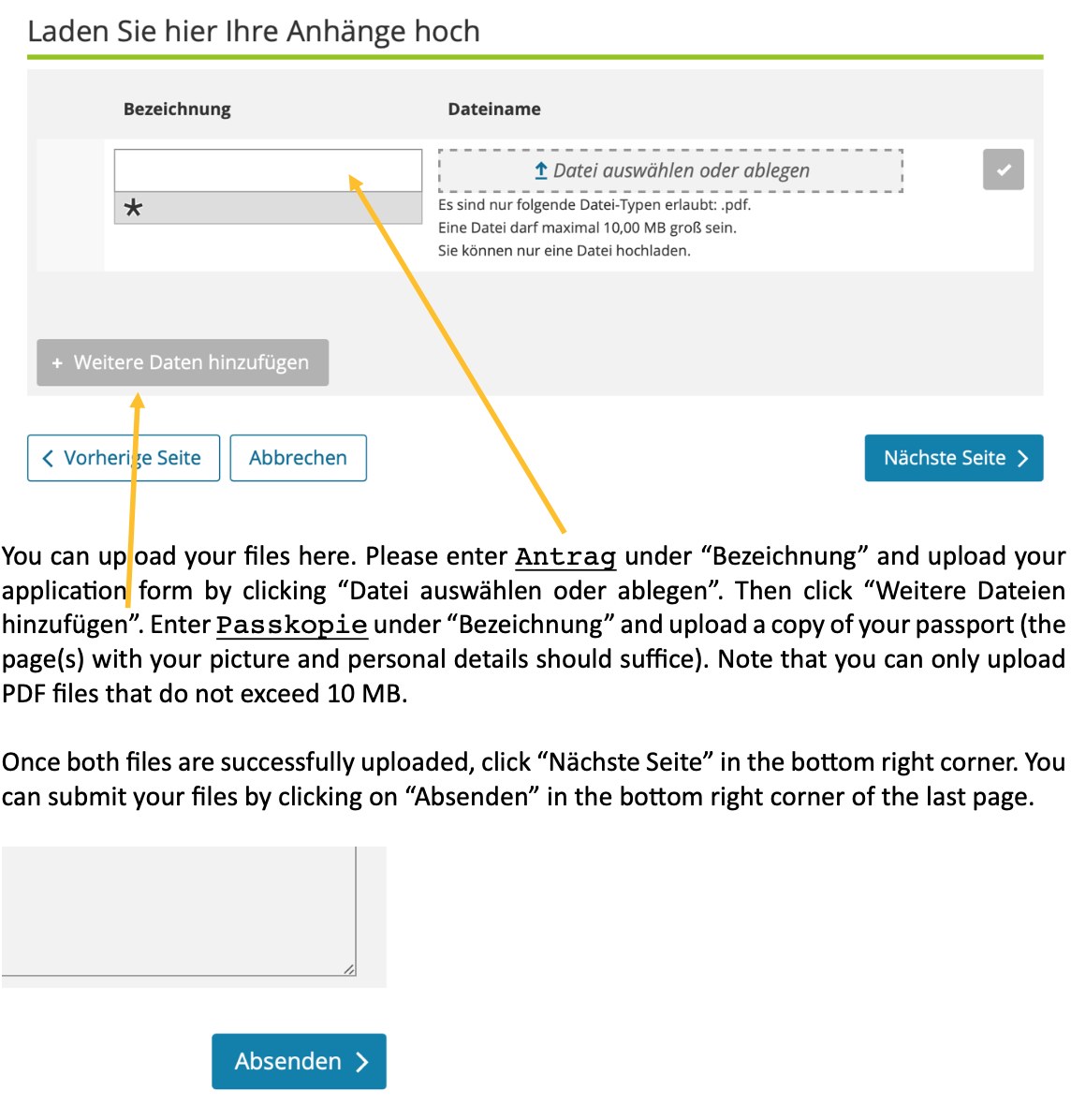
- Under "Bezeichnung" type Antrag and upload the form via "Datei auswählen oder ablegen"
- Click "Weitere Dateien hinzufügen", type Passkopie, and upload your passport page
- Once both are uploaded, click "Nächste Seite", then "Absenden" on the last page
9. Wait for the letter and pass it on
The Steuer-ID arrives by post, possibly after several weeks. Send the number to whoever requested it (for example your HU contact).
Carddoger summary
You can get a Steuer-ID from abroad entirely online: BZSt form 010250 plus an ELSTER non-tax message, no ELSTER account required. You need a passport PDF, a handwritten signature, and your foreign address. The usual trigger is a German institution that must report a tax ID before reimbursing or paying someone abroad.
State your real reason, and if unsure ask the institution requesting the ID how to word it. The ID only comes by letter, so allow several weeks. Form fields, office responsibilities, and submission routes follow BZSt and ELSTER's official pages.